






HashWatcher Is the App Home Crypto Miners Have Been Waiting For!

Between Bitaxes, NerdQAxes, Octaxes, Canaan Avalons, and a growing collection of solo miners spread across a home office and a dedicated mining shed, keeping tabs on temperatures, hashrates, fan speeds, and pool connections across dozens of devices has become a genuine operational challenge. Individual manufacturer apps only cover their own hardware. Browser dashboards require being on the same local network. And when something overheats at 2am, there’s no alert to tell you about it until you check manually the next morning.
“Managing one or two home miners is easy. Managing thirty is a different problem entirely!” – The Hobbyist Miner
That’s the problem HashWatcher was built to solve and after putting it through its paces across a full fleet of home miners, it’s the most complete solution we’ve come across for this exact use case.
Check out the full walkthrough video here: HashWatcher App — Full Review & Fleet Setup for Home Crypto Miners
What is HashWatcher?
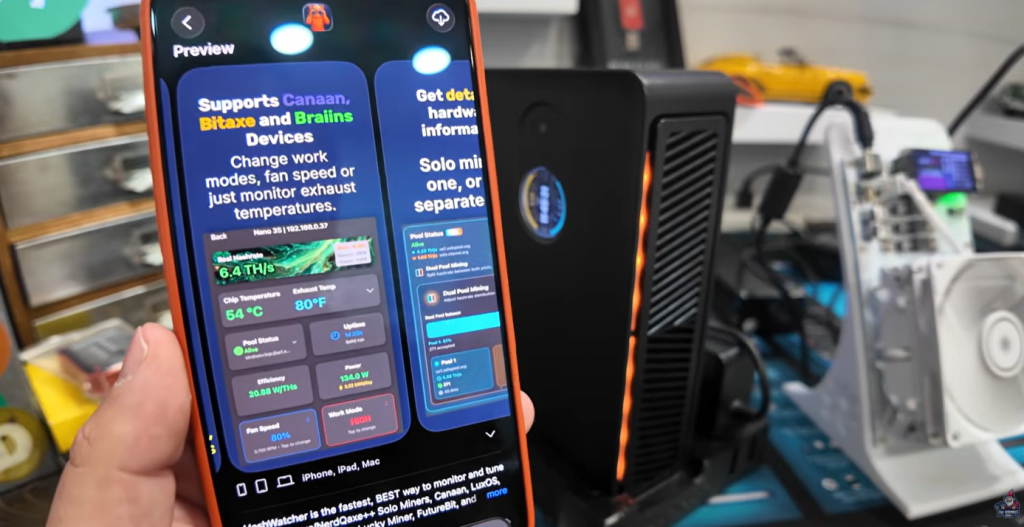
HashWatcher is a mobile fleet management app available on both iOS and Android, designed specifically for home crypto miners. It provides a single unified dashboard for monitoring and controlling a wide range of mining hardware, from small Bitaxe style solo miners all the way up to full size commercial ASICs.
The supported hardware list is extensive and covers the most common home mining devices in use today:
- Bitaxe (all variants)
- NerdQAxe and NerdQAxe Hydro
- OctAxe
- Canaan Avalon (Nano 3S and other models)
- Lucky Miners
- BTC Hash Cards (MagicMiner)
- Jingle Mining Solo Pro
- Hammer Miners
- BraiinOS miners
- VnishOS Miners and More!
For anyone running a mixed fleet — which describes most serious home miners, the ability to see everything on one screen is immediately valuable.
Getting Started: Adding Your First Miners
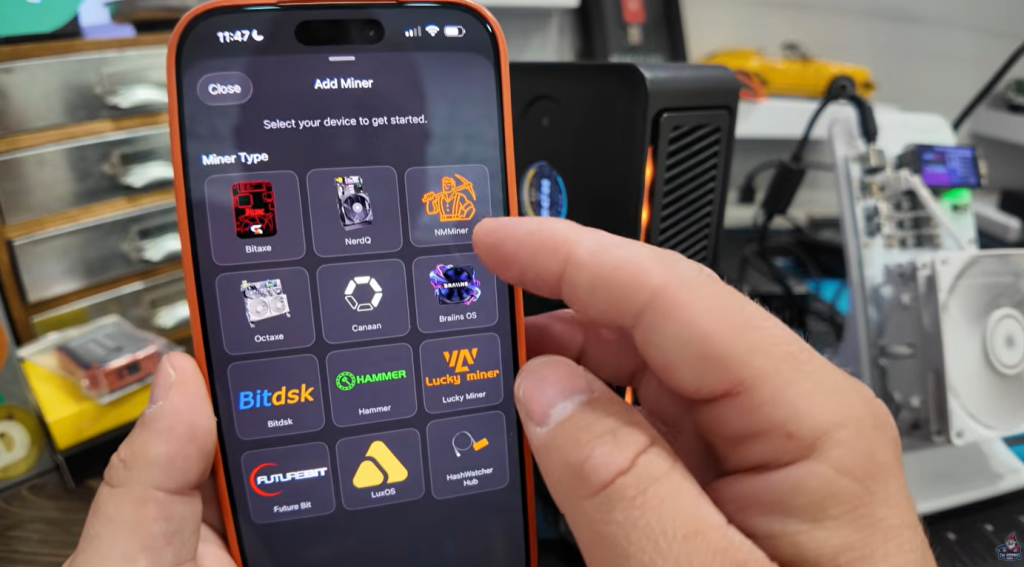
The initial setup experience is refreshingly simple. Tap Add Miner, select your hardware type from the supported device list, enter a name and the local IP address, and hit connect. That’s it. The miner shows up on the dashboard within seconds, pulling live data from the device.
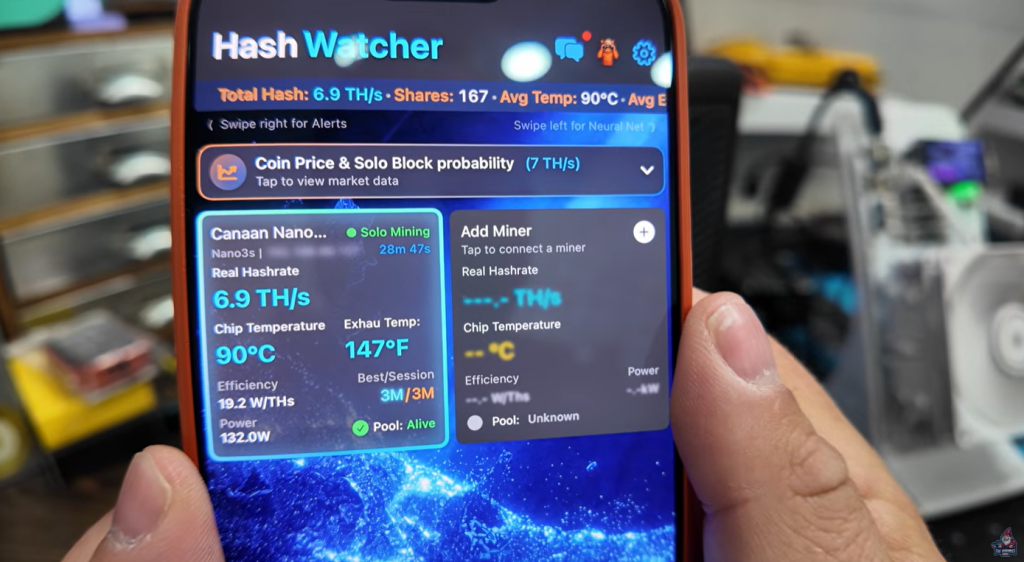
For the Canaan Nano 3S tested here, the miner appeared immediately showing 6.9 terrahash, a chip temperature of 90°C, and an exhaust temperature of 147°F, numbers that immediately validated why a fleet management tool with temperature alerting was needed in the first place.
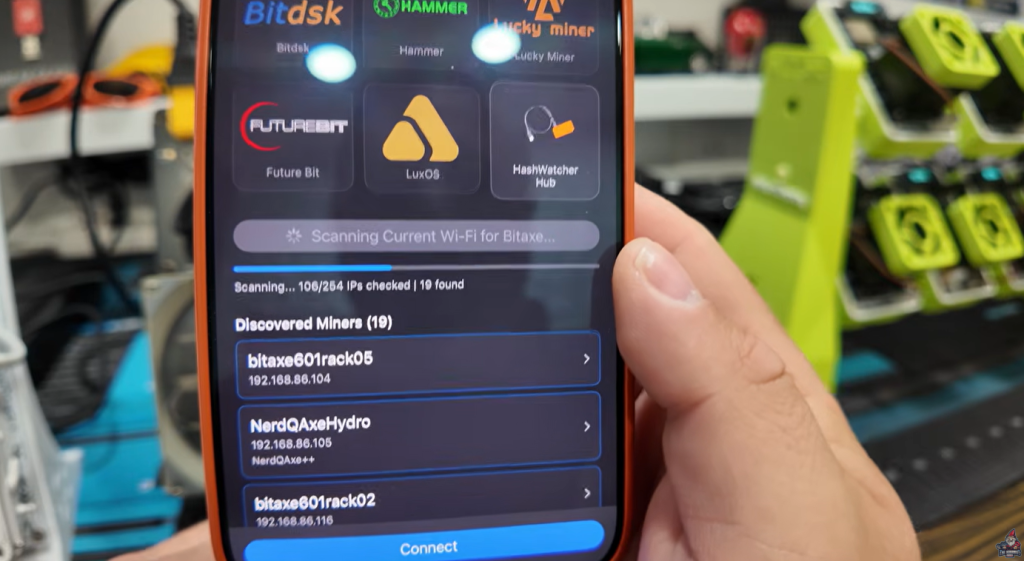
For Bitaxe style miners, HashWatcher includes a network scan feature that discovers all compatible devices on your local network automatically. Rather than adding a dozen miners by IP address one at a time, the scan returns a full list and lets you connect each one with a single tap. Across a rack of Bitaxes, this alone saves a significant amount of setup time.
What You Can Actually Do With this App
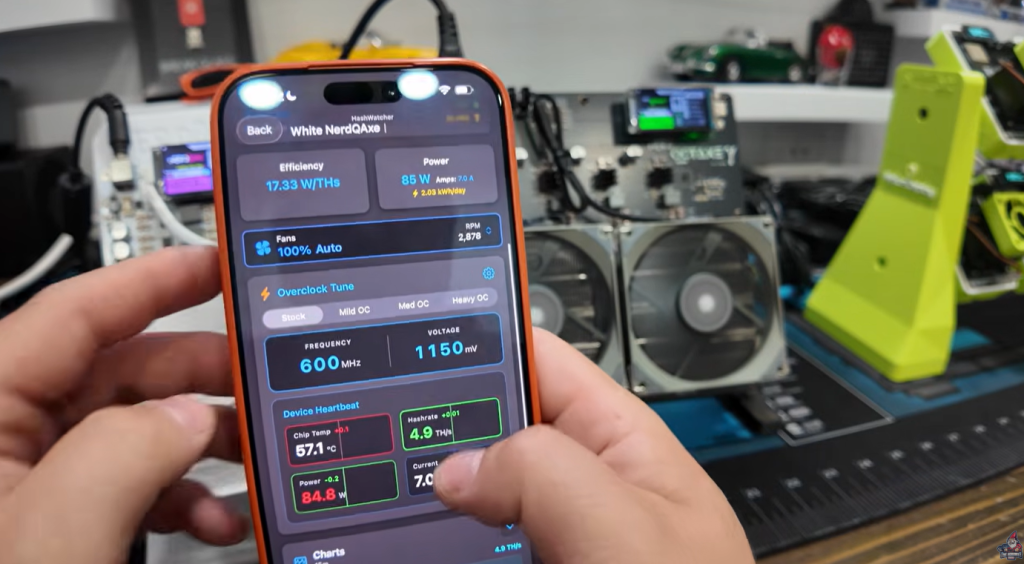
Beyond monitoring, HashWatcher offers meaningful control over connected hardwar, in some cases going further than the manufacturer’s own apps.
Fan speed control is a standout example. The Canaan Nano 3S is notorious for running hot, and the official Canaan family app doesn’t provide a way to manually adjust fan speeds. HashWatcher does. From the device detail screen, fan speed can be set to any value or left on automatic, and the change applies immediately. For a miner that consistently pushes into the 90°C range, having direct fan control is genuinely useful and not something the stock app offers.
Overclock presets for Bitaxe type miners simplify what is usually a manual, technical process. Rather than editing configuration files or navigating firmware settings, HashWatcher presents preset modes, stock, mild overclock, medium overclock, and heavy overclock, selectable from a single screen. The app also displays the device’s ASIC chip model alongside the preset options, which is a nice detail for anyone tracking performance across different hardware generations.
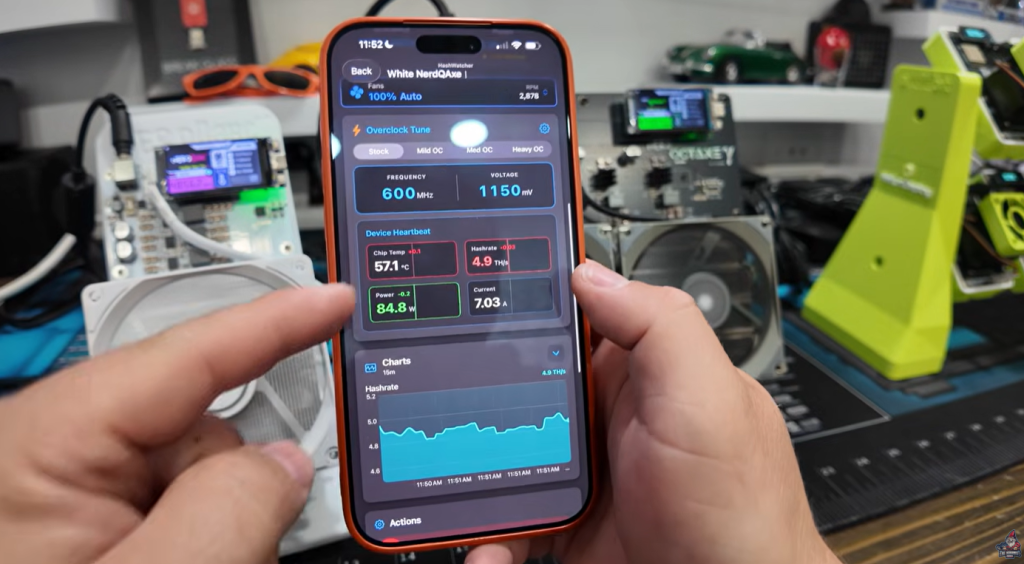
Per-device controls across the dashboard include:
- Work mode adjustments (eco, standard, performance)
- Fan speed manual and automatic control
- Remote reboot with a simple toggle, flip the switch, watch the miner power cycle
- Pause mining without a full reboot
- Temperature and hashrate history charts
- Pool connection status and routing details
- Uptime tracking
The summary view on the right side of the dashboard aggregates everything across the full fleet, total hashrate by device, pool routing for each miner, and a quick visual of anything that’s fallen onto a failover pool unexpectedly. Spotting that two devices had silently switched to the CK Pool failover instead of the intended solo configuration is the kind of thing that would have gone unnoticed for days without a unified view.
Temperature Alerts: The Feature That Matters Most
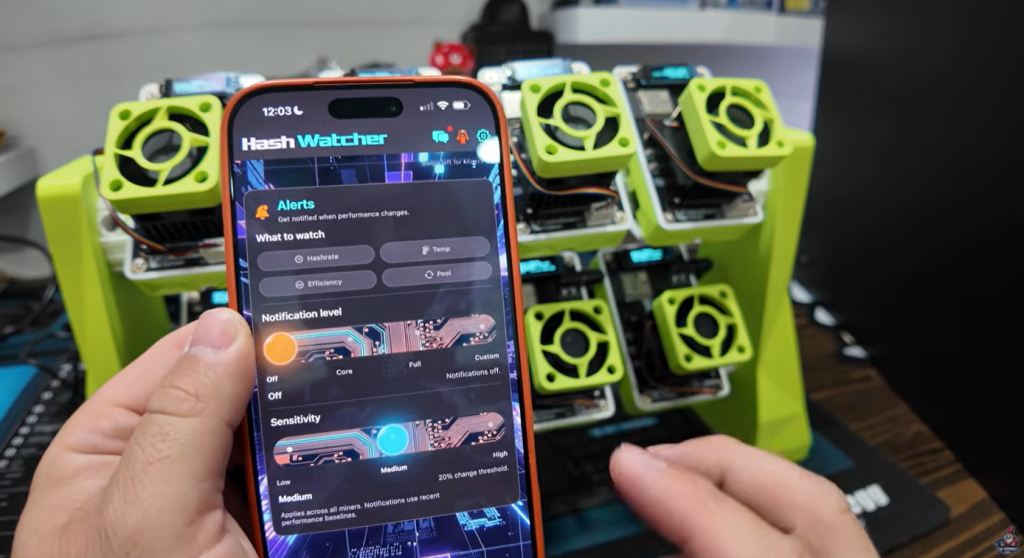
The single most compelling reason to add HashWatcher to a home mining setup is the thermal watchdog and alert system.
Under settings, device wide temperature monitoring can be enabled across the entire fleet in a single toggle. Set a temperature threshold, and the app sends an alert notification the moment any miner crosses it. The alert includes the device name and the trigger condition, so when the Nano 3S spikes, there’s an immediate push notification identifying exactly which miner is the problem.
For miners running in a shed, a garage, or any space that isn’t constantly monitored, this changes the risk profile significantly. Bitaxes in particular are sensitive to temperature fluctuations, and without alerting, an overheating miner can sit undetected for hours. With HashWatcher’s thermal watchdog running, the window between a problem starting and a person knowing about it collapses to seconds.
Additional alert types are configurable beyond just temperature, hashrate drops, pool connection failures, and efficiency thresholds can all trigger notifications, giving a comprehensive early warning system across the fleet.
Free vs. Premium: What You Get and What It Costs
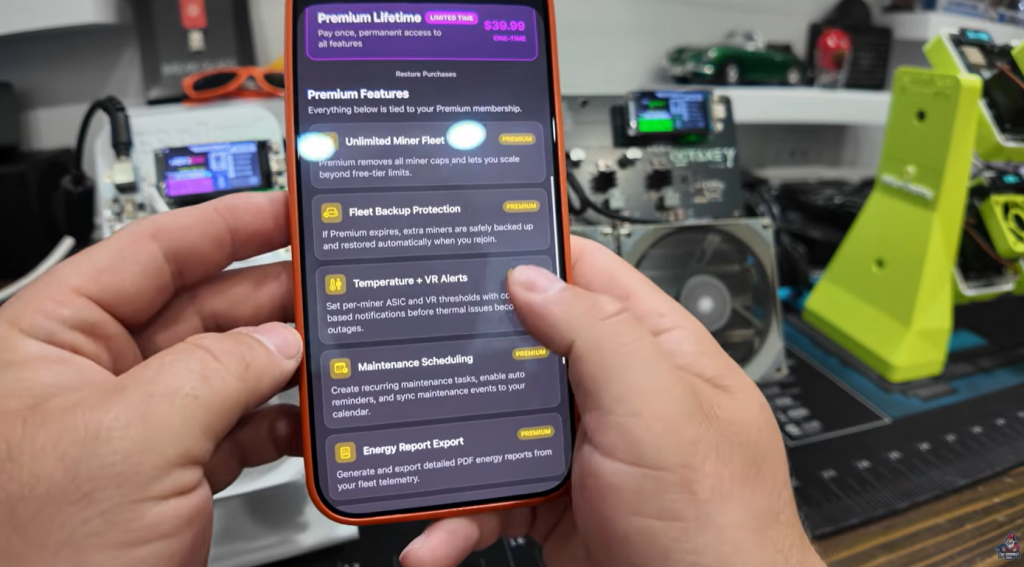
HashWatcher offers a free tier that supports up to five miners with core monitoring features, a genuinely useful starting point for anyone with a small setup. For larger fleets, a premium membership unlocks:
- Unlimited miner fleet management
- Temperature and hashrate alerts
- Backup and data protection
- Maintenance scheduling
- Energy reporting and coin stats
- Priority tech support
Pricing is straightforward: $2.99/month, $19.99/year, or a $39.99 lifetime license. For a tool that solves a real problem and replaces several incomplete solutions, the annual plan in particular represents strong value, especially if temperature alerting alone was the reason for looking.
Download Hashwatcher entirely free and test it out:
Hashwatcher IOS
Hashwatcher Android
The Neural Network View and Widget Features
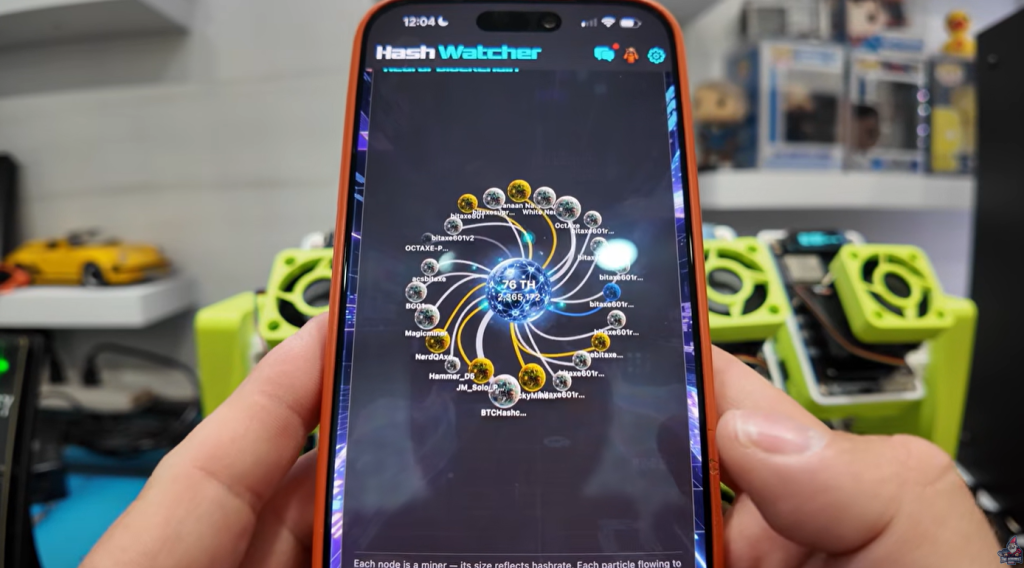
Two additional features are worth calling out specifically, even if they’re less about utility and more about presentation.
The Neural Blockchain Network view is a live visualization that renders each connected miner as a node, sized proportionally to its hashrate, with particle flows representing accepted shares moving toward the center. It looks, genuinely, like something out of a science fiction film. The practical value is limited, it’s not a tool for diagnosing problems but as a visual representation of a home mining fleet operating in real time, it’s unlike anything else available in this category. Putting it on a large screen or TV monitor in a mining space would be a legitimate setup goal.
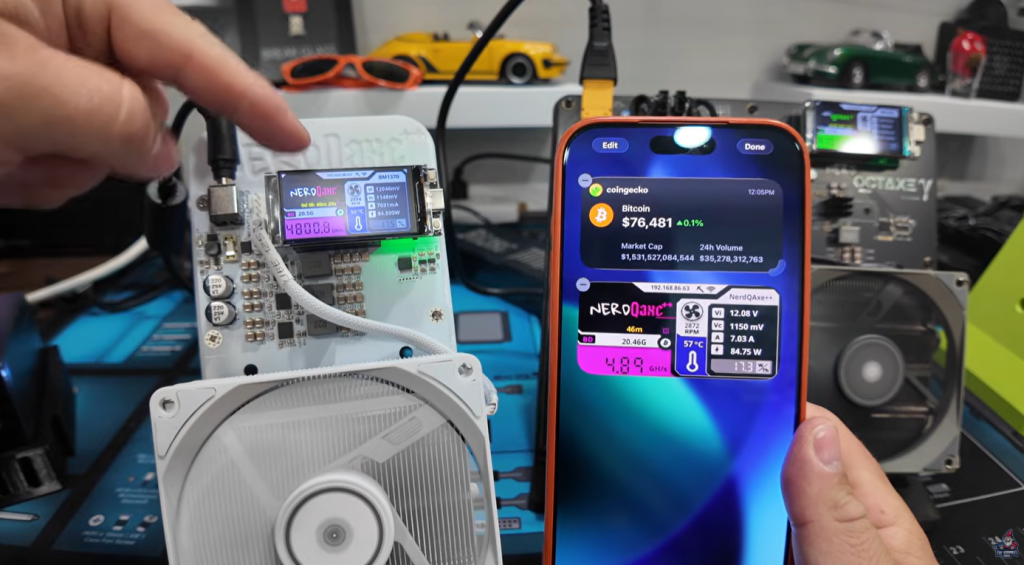
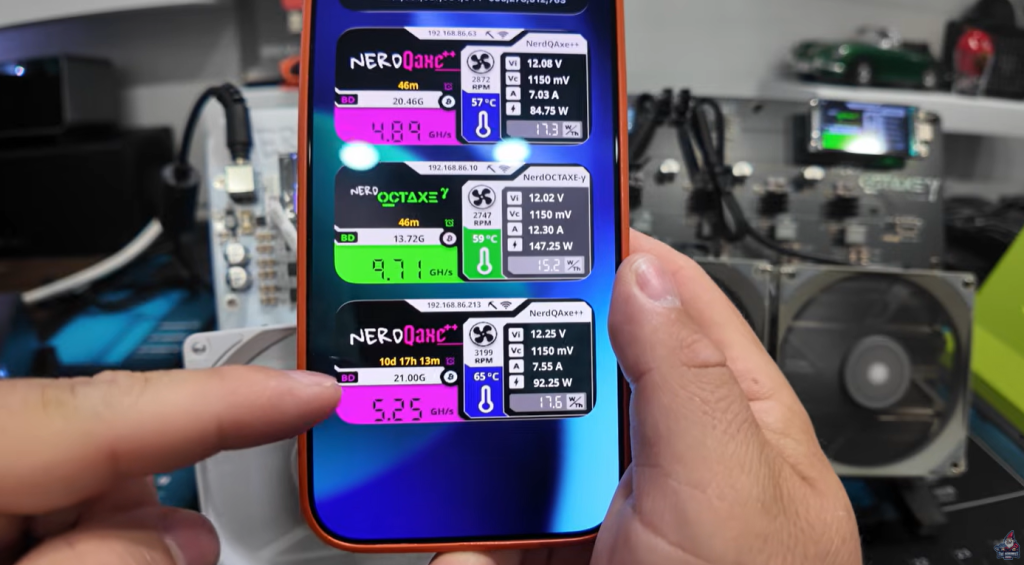
The phone widget feature lets you mirror any miner’s live dashboard directly to your home screen. Temperature, hashrate, fan speed, and pool status, all visible without opening the app. With multiple widgets configured side by side, a quick glance at the phone gives an at-a-glance status check on the most important devices in the fleet.
Room to Grow
HashWatcher is excellent for what it is today, and there are a few directions that would make it even more powerful.
The most significant gap is remote access. Currently, the app works on your local network, with remote connectivity requiring a VPN setup or the optional HashHub hardware device. The HashHub connects miners to a local hub that can report back to HashWatcher’s servers, enabling remote monitoring without a VPN, but it’s an additional purchase and setup step. A cleaner solution would be cloud connected monitoring that works out of the box: devices report to a server, the app authenticates against that server, and remote access is simply part of the experience. The infrastructure for this largely exists in the HashHub model, it’s just a matter of making it more seamless.
A web interface would also be a meaningful addition. The neural network visualization in particular deserves to live on a large screen, and a browser-based dashboard would open that up without needing a mirrored phone screen.
The Bottom Line
If you’re running more than a handful of home miners across different hardware types, HashWatcher fills a gap that no single manufacturer’s app was ever going to fill. The combination of unified monitoring, fan and overclock control, temperature alerting, and clean hardware support across the most popular home mining devices makes it a straightforward recommendation.
The free tier covers small setups without asking for anything. The premium tier, at $19.99 for a full year, is easy to justify the moment temperature alerting becomes something you actually need, which for anyone running miners in a space they can’t watch constantly, is immediately.
Download links for both iOS and Android can be round here.
See You Next Time!
Already running HashWatcher? Got thoughts on the app or suggestions for what features you’d want to see added? Come join the conversation in The Hobbyist Miner Community Discord, free to join here!
Watch this entire download, setup and configuration video on the Hashwatcher App