$275 Mini Home Bitcoin Miner for Getting Started, with a screen!

Are you looking for a unique, compact, and affordable way to get into Bitcoin mining? Or maybe you just want the ultimate conversation starter for your home office setup, one that actually mines real Bitcoin? If so, you’re going to want to check out today’s hands-on review of the Bitaxe Touch — a slick, innovative desktop miner retailing at just $275. And let me tell you: this little unit delivers way more than just hashrate stats.
In this article , we’ll dive deep into everything you need to know about the Bitaxe Touch, from unboxing to setup, first impressions, dashboards, settings, performance, and whether solo mining is really in the cards. I’ve loaded this up with pictures, tips, and fun stuff you don’t want to miss!
For more insights on this topic check out this detailed video: $275 Mini Home Bitcoin Miner for Getting Started!
Table of Contents
- First Impressions & Unboxing
- What’s Inside the Box?
- Physical Design & Build Quality
- Ports & Powered Connections
- Plugging In & Initial Setup
- Dashboard & Touchscreen Overview
- Exploring the Dashboard Features
- Performance: Hashrate, Modes & Thermal Stats
- Web Dashboard & Network Integration
- Solo Mining Realities
- Models, Colors, and Buying Advice
- Final Thoughts: Is the Bitaxxe Touch Worth It?
First Impressions & Unboxing

There’s nothing quite like new miner day! The excitement is off the charts when a brand new Bitcoin miner hits your doorstep, especially when it’s as slick as the Bitaxe Touch. I have to shout out the crew at Advanced Crypto Services for sending me an early version of this unit to check out!
The shipping box is sturdy and well-packed. Right from the start, the vibe is solid.
“I’ve seen a number of these units out there. Excited to get an early version of this. Let’s open it up and see what’s inside.” – The Hobbyist Miner
The Genesis Block Easter Egg
As soon as you open the package, there’s something special inside: a nod to Bitcoin’s origins. Tucked right on top is a slip of paper with the historic quote:
“Chancellor on brink of second bailout for banks.” – The Times Newspaper
The Bitcoin Genesis Block, January 3, 2009
A subtle but awesome tribute to Satoshi’s launch. It’s these touches that get you hyped!
What’s Inside the Box?
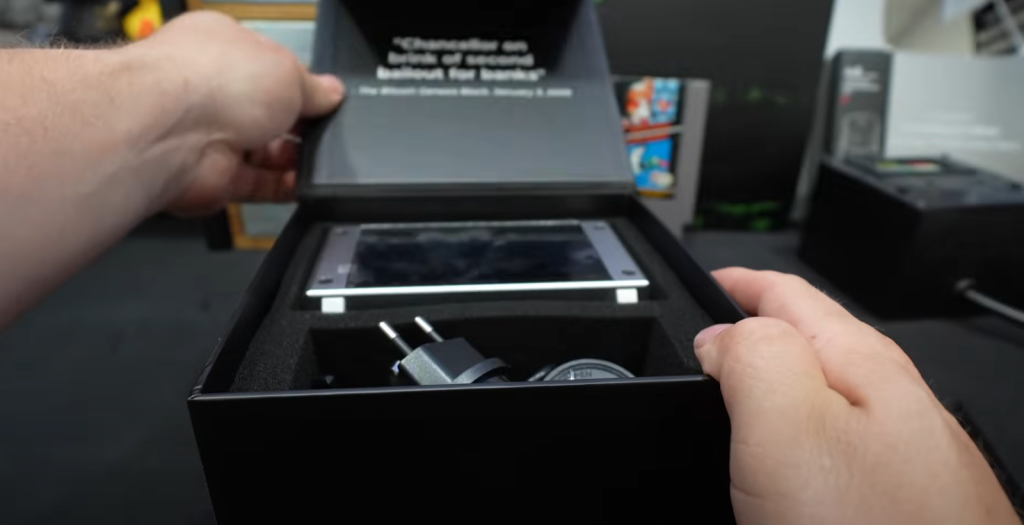
The box includes everything you need to get mining right out of the gate, no matter where you are in the world.
Contents:
- Bitaxe Touch Miner – Fancy!
- Power supply with a range of plug adapters (regional)
- Quick start & QA Test Sheet (verified serial, model, uptime)
- Branded power cable (with Bitaxe Touch etched in—nice!)
- A smile because you just joined the coolest club in Bitcoin mining! “The Bitaxe Cult”
Let’s be real: not every device gets tested before shipping. Seeing an actual QA slip with serial, model, and verified uptime (mine had about 10 minutes on the clock) gave a reassuring first impression. Bitmain are you seeing this?
“This is actually pretty cool to see that… like, hey, this has been tested, because I’ll be honest, we get a lot of stuff and it runs for, like an hour or it’s DOA. So this is actually really, really convenient.” – The Hobbyist Miner
Watch my entire unboxing of the Bitaxe Touch right here!
Physical Design & Build Quality

The Bitaxe Touch means business. This is not some cheap plastic trinket — it’s got real heft and a super-clean, premium look.
- Brushed metal chassis (silver or “midnight graphite” available)
- “Proudly made in Texas” stamped on the back (love that!)
- High-gloss, smudge-magnet finish—shiny!
- Large, bright touchscreen front and center
- Dual-fan design (one intake, one exhaust)
- Serial, model, ACS/Bitaxe branding tastefully displayed
This thing is both a functional miner and a serious desk flex. If you want your work buddies to ask questions, just plop this under your monitor. Maybe mine from work, for free! It’s a “clock” right?
“Wow, this is heavy. This is not cheap. Look at this.. This is crazy. Shiny.” – The Hobbyist Miner
Ports & Powered Connections
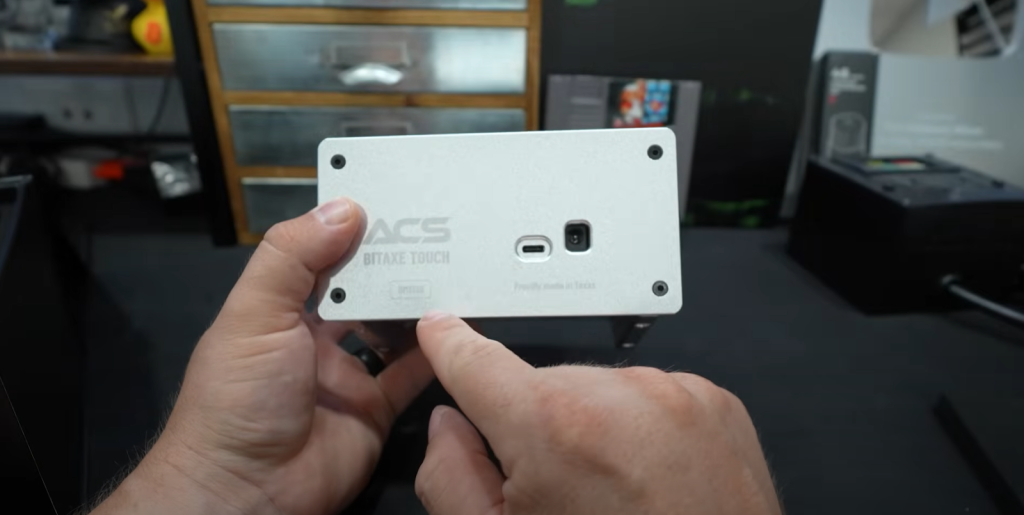
Let’s take a tour of what you can plug in and how it all fits together.
- USB Type-C Port.
- Not fully documented in the quickstart, but likely for alternative power or data in future firmware.
- Standard Barrel Jack Power Connector.
- The main “juice” for the miner.
- Variety of Regional Power Adapters.
- No matter your country, you’ll be able to plug and play.
- Security Screws.
- Keeps everything locked down—you won’t accidentally pop open the miner.
“Here’s your serial number. It says BM 1368. Look at that ACS Bitaxe Touch. Proudly made in Texas.” – The Hobbyist Miner
Plugging In & Initial Setup
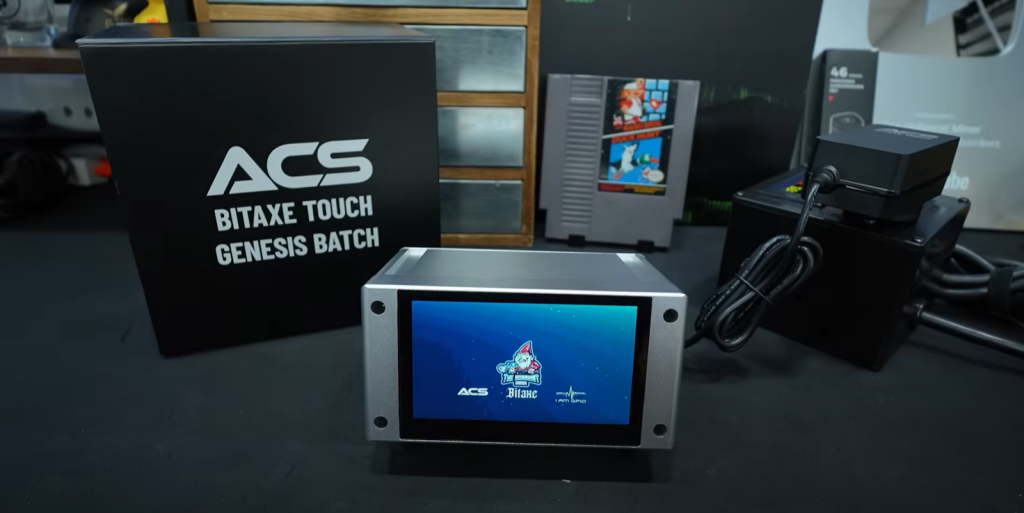
Setting up the Bitaxe Touch is pretty much foolproof and honestly kind of fun. Here’s the step-by-step experience:
- Unbox everything and pick your power adapter.
- Plug the miner into wall outlet (always good to check power consumption).
- Power on—the screen lights up instantly with a cool boot animation.
- Enjoy a surprise: If you’re lucky, you might even see a custom logo (mine flashed the Hobbyist Miner logo upon boot, thanks ACS!
- Follow the touchscreen wizard:
- Connect to Wi-Fi
- Pick your mining pool
- Enter your BTC wallet address (or scan QR)
- Get your miner’s IP address for web dashboard access
The touchscreen interface is responsive, intuitive, and pretty slick. No cryptic command-line stuff here.
“Begin setup… So it’s asking us for our wireless info. Going to go ahead and put that in. Tested connection… Oh, it’s asking me what pool I want to mine to… Gives me the IP address of the miner after I connected to my wireless…” – The Hobbyist Miner
Watch how easy the entire setup is in this video!
Dashboard & Touchscreen Overview
Here’s where the Bitaxe Touch really separates itself from the crowd. The front panel’s big, bright touchscreen isn’t just for show—it’s the real control center and delivers a seriously fun user experience.
Once you get through the initial setup wizard (Wi-Fi, pool, BTC address), you’re greeted with a slick, modern dashboard. There’s even a built-in tutorial:
- Touch controls: Swipe through multiple screens/information panels.
- Navigation tabs on the left: Home, Hashrate, Settings, etc.
- Live Bitcoin network data: Price, block height, network hash rate, difficulty, fee rates, and halving countdown.
- Modern graphing: Real-time plots of hashrate and performance.
- Status icons/bar: Wi-Fi, pool, brightness, fan speed, and more.
- Theme switching: (yes, you can even rock a “HobbyistMiner” skin if you’ve got it).
“This dashboard is totally different. I’m actually really, really surprised by it, but it looks awesome.” – The Hobbyist Miner
Key Touchscreen Panels
Let’s do a quick walk-through of the tabs/panels on the Bitaxxe Touch touchscreen:
Home Panel
- Bitcoin’s current price (with multiple fiat options: USD, CAD, EUR)
- Network hashrate and difficulty
- Block height and halving countdown
- Network fees
Hashrate Panel
- Live hashrate (updates every few seconds)
- Smooth, real-time line graph
- Displays pool connection and status
Hardware Panel
- ASIC temperature
- Fan speed (both intake and exhaust)
- Uptime counter
- Power draw (watts/month est.)
Settings Panel
- Wi-Fi/network management
- Screen brightness
- Mining performance presets:
- Quiet (silent, lower performance)
- Balanced (default)
- Turbo (full power, fans kick in)
- Theme selection (Hobbyist, Bitaxe Red, Solo, Default)
- System logs and firmware info
“Quiet mode, lower fan speed; balance mode; turbo mode—oh, I want to see what turbo’s like. Let’s do that. Oh, I can hear the fans going now. So we were definitely right: intake one side, exhaust the other.” – The Hobbyist Miner
Exploring the Dashboard Features

There is SO much available from the touchscreen alone, you almost don’t need to open a browser. Yet, if you want to go deeper, the web dashboard unlocks even more detail (see below).
Navigation Is Super Intuitive
- Tap the screen to cycle values
- Use left-side tabs for deeper menus
- Touch Wi-Fi icon for network details (shows IP, QR code for fast access)
- Built-in guided tutorial for total beginners
“It kind of forces you through the tutorial… How nice of you ACS!” – The Hobbyist Miner
Switching Themes
Customizability isn’t just a gimmick here—you can actually switch to a few preset visual themes. From bright white with the “Hobbyist Miner” logo to bold red or “Solo Mining Company,” or keep it simple and clean.
“Look at the themes there. The Hobbyist Miner theme… I like that. Then there’s Bitaxe Red, Solo Mining Company, and Default.” – The Hobbyist Miner
See all the Themes, Colors and Style in this video!
Download and apply The Hobbyist Miner Theme from ACS’s Official GitHub
Performance: Hashrate, Modes & Thermal Stats
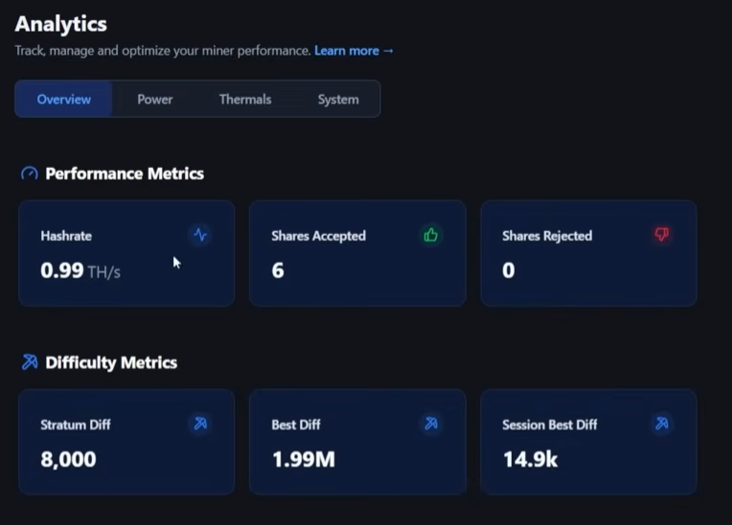
Of course, the real question on everyone’s mind: What kind of hashrate do you actually get?
BM 1368 (Silver Model) — Real-World Results
Stock (Balanced):
- 650–750 GH/s is advertised
- Out of the box, hit ~0.96 TH/s (960 GH/s) on Turbo Mode!
Turbo Mode:
- Fan noise increases (but not crazy)
- Hashrate peaks just under 1 TH/s (“broke a terahash”)
Power Draw:
- Less than 20 watts at the wall (!)
Thermals:
- 41°C average temperature on Turbo
- Fans automatically ramp up as needed (direction confirmed: intake/exhaust)
All stats available live, both on the panel and from the web dashboard.
The Three Performance Presets
- Quiet Mode:
Lowest performance, minimal fan noise. Best for literally silent operation. - Balanced Mode (Default):
Standard profile, good performance/noise tradeoff. - Turbo Mode:
Go full ham! Highest possible hashrate, fans audible but not loud.
(Tip: If you’re planning to keep it on your desk, Quiet mode is fine for meetings and calls—Turbo is for the late night hashrace!)
Web Dashboard & Network Integration
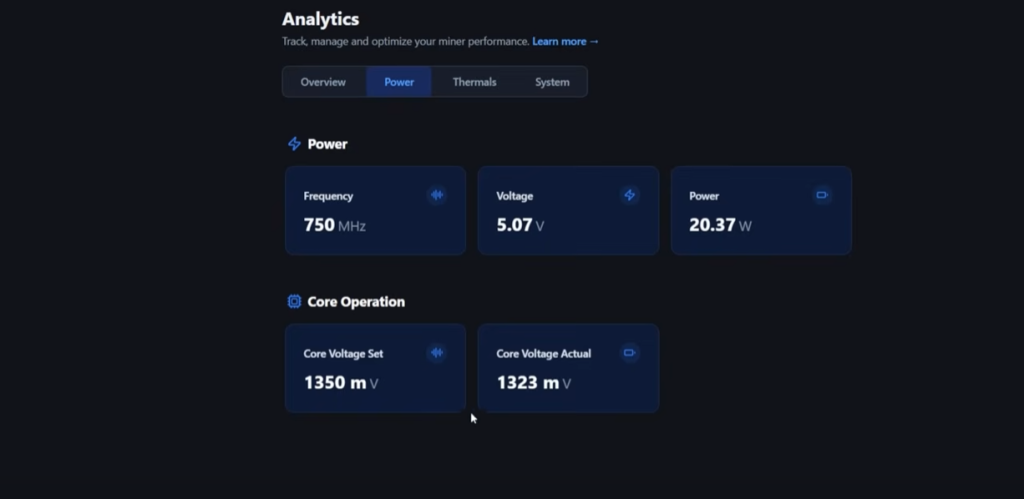
Beyond the touchscreen is the “pro” layer—the Bitaxe Touch’s web dashboard. Access it by typing the miner’s local IP into any browser on your network (QR code on the panel for fast access).
Web Dashboard Features
- Model & hardware info (BM 1368 or BM 1370, serial, uptime)
- Preset selection (change performance modes)
- Full real-time stats:
- Hashrate (live & historic)
- Power draw (graph)
- ASIC temperatures (historical log)
- Fan speed
- Wi-Fi details
- Logs & firmware info
- Miner scanning:
- Sees multiple Bitaxe units, just like the “Swarm mechanic” from open firmware miners
- Pool settings:
- Change pool connections any time (nice for solo, pool, testnet etc.)
- Analytics tab:
- Even deeper stats, down to frequency/thermal settings
“They’ve done some work with this dashboard and interface, which is pretty slick… Under Pool, I put mine on Braiins. I like their solo pool…” – The Hobbyist Miner
Checkout The Hobbyist Miner’s Home Bitcoin Solo Miners on Braiin’s Pool Here!
Built-In Support/Help
If you ever need support, hit “Help” and it links straight out to Advanced Crypto Services’ website. Very handy and customer centric!
Solo Mining Realities
OK, let’s be honest—can you actually earn Bitcoin solo mining with this miner? Let’s break it down:
Power Efficiency
- Under 20 watts:
Less energy use than an LED bulb!
Payouts
- Is this a ‘get rich’ miner?
Nope. Like all solo miners, you only get paid when you hit a block ($340,000+ at time of this article). - Odds?
It’s like a lottery ticket. I plugged my hashrate (0.98 TH/s) into the SoloLuck calculator:- 1 in 6,486,995 chance per day
- 1 in 17,773 chance per year
“So are you going to hit a bitcoin block with this? Probably not. Not today, not tomorrow, not next week, probably not next year. However, there’s a chance. And keep that in mind—for $275, it’s a great desk piece.” – The Hobbyist Miner
The Solo Mining Truth
“This is meant to be a solo bitcoin miner, which means you will not get paid anything unless you hit a bitcoin block…for $275, it’s a great desk piece. It shows bitcoin’s price. It’s got some great hash rate info. It’s a great talking piece. And there’s a chance to hit a bitcoin block, which is pretty, pretty sweet.” – The Hobbyist Miner
Models, Colors, and Buying Advice
Bitaxe Touch comes in two versions:
| Model | Advertised Hashrate | Power Draw | Screen Size | MSRP | Main Chip |
| BM 1368 | 650-750 GH/s | <20W | 4.3” | $275 | BM1368 ASIC |
| BM 1370 | 950-1,000 GH/s | Slightly Higher | 4.3” | ~$325 | BM1370 ASIC |
- Colors: Silver or Midnight Graphite available!
- Desk Aesthetics: Both look super slick under a monitor, especially with a white Hobbyist Miner logo on Midnight Graphite.
Where to Buy + Discount Code
Ready to get your own Bitaxe Touch?
- Purchase directly from Advanced Crypto Services, located in Texas!
- Use code hobbyist at checkout to drop the price from $275 to $255.
- Stock available in Silver (my unit) and Midnight Graphite.
Final Thoughts: Is the Bitaxe Touch Worth It?
After a few days of hands-on use, here’s my honest take:
What I Loved
- Slick, premium design. Seriously, this is hands-down the best-looking compact miner I’ve ever seen.
- Awesomely interactive touchscreen. Stats, network info, themes, and settings—all easy to access.
- Super energy efficient. Less than 20W! No heat/noise drama.
- Silent/quiet modes for meetings. Perfect as a desk ornament with function.
- Easy setup & solid documentation. You’ll be up and running in minutes, whether you’re a total beginner or a die-hard miner.
- Custom theming. Hobbyist logo squad represent!
- True conversation starter. People will ask about it.
What to Know
- This is not a traditional “profit for sure” miner—it’s a solo lottery. Odds are long, but there’s always that wild chance.
- Still, for the price, it’s basically the best Bitcoin-themed desk gadget with real mining capability.
“A great talking piece. I like it because it’s bitcoin’s price on it. So I’m probably going to leave it up on that screen on my desk, which I think will look really, really good. And there’s a chance to hit a bitcoin block, which is pretty, pretty sweet. Check it out.” – The Hobbyist Miner
Frequently Asked Questions (FAQ)
Is there a chance to actually hit a block solo mining with such a small miner?
Yes, but it’s a “lottery odds” type of chance. Most people just use it as a fun, energy-efficient Bitcoin desk gadget.
What’s the power draw and noise like?
Under 20 watts, extremely quiet on “Quiet” mode, only a soft whoosh on “Turbo.”
Can you join normal mining pools instead?
Yes! You can point it to any standard mining pool, but don’t expect pool payouts to be significant given the low hashrate.
Is it beginner-friendly?
Absolutely—the guided touchscreen setup, simple menus, and QR codes make it plug-and-play.
Can you monitor and control everything from your phone?
If you’re on the same Wi-Fi network, just scan the QR code on the touchscreen for instant browser access to the web dashboard.
Wrap-Up: Should You Get the Bitaxe Touch?
If you’re even a little bit of a Bitcoin nerd, love slick gadgets, or just want a really unique and functional décor piece… This thing is a blast! Whether you’re mining solo “for the lottery” or just showing off real-time Bitcoin stats and your personal hash rate, the Bitaxe Touch won’t disappoint.
- Perfect for: Bitcoiners, tinkerers, hobbyists, and anyone who wants a slick, low-power home miner with personality.
- Not for: Anyone hoping for a daily payout or ROI mining farm!
Big thanks again to Advanced Crypto Services for sending over the review unit. Use code hobbyist for a discount if you decide to grab one!
Have more questions? Feel free to join The Hobbyist Miner discord community and ask! Loads of friendly new and veteran miners from all walks of life! Beginners are welcome!