The PERFECT Mini Bitcoin Miner for Beginners! A Deep Dive into the Bitaxe Supra Hex
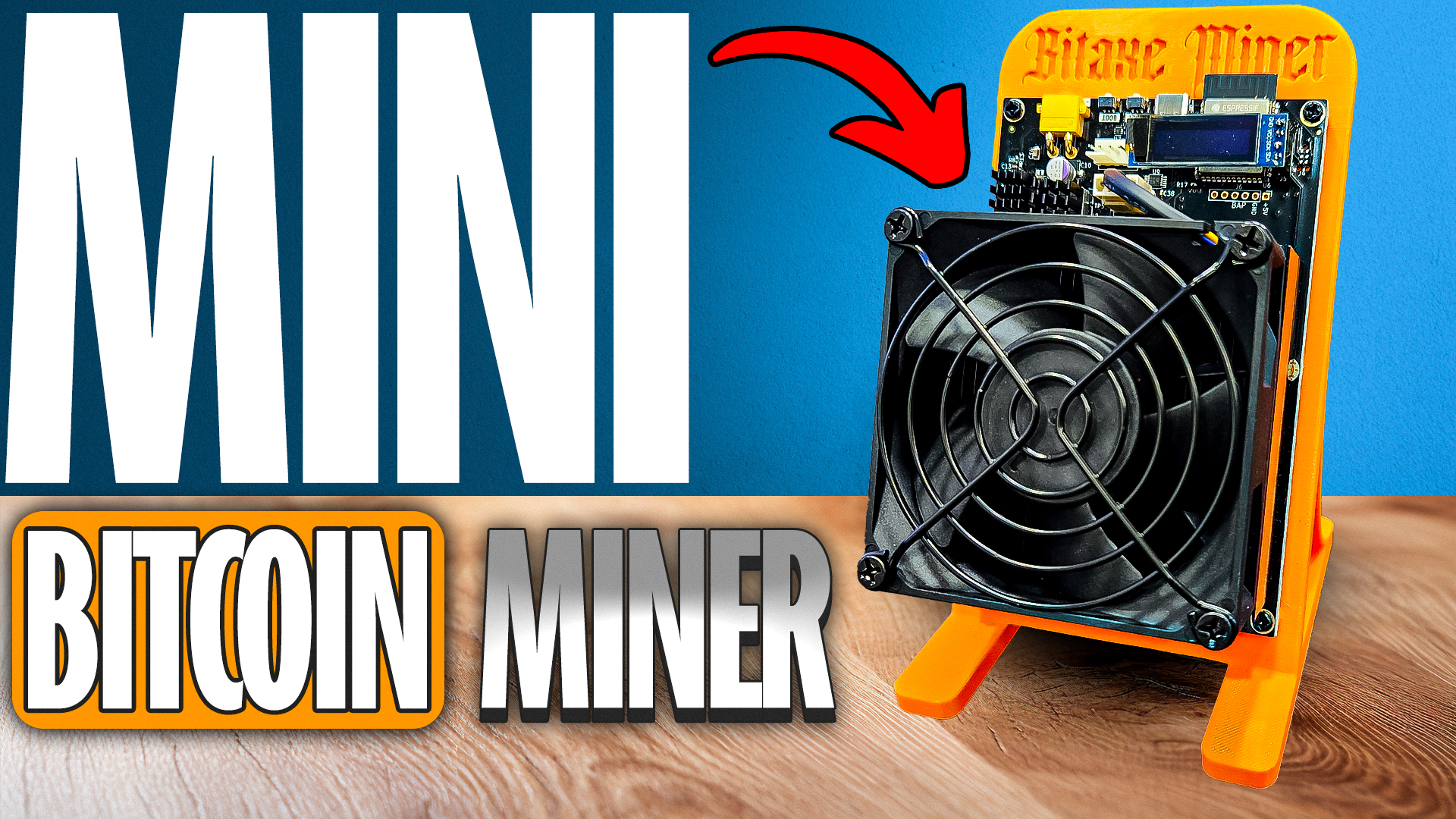
Hey, crypto miners! Welcome back. Today, we’re doing something a little different and super exciting for anyone interested in solo Bitcoin mining at home. The awesome folks over at Bitcoin Merch hooked me up with their brand new Bitaxe Supra Hex—the latest mini Bitcoin miner that promises great fun for tinkerers and hobbyists.
In this article post, I’ll walk you through the unboxing, setup, hands-on performance, and my own home mining journey. Whether you’re a curious beginner or a hardcore BTC head, you’ll get all the details you need right here.
For more insights on this topic check out this detailed video: The PERFECT Mini Bitcoin Miner for Beginners!
Table of Contents
- Unboxing the Bitaxe Supra Hex: First Impressions
- The Appeal of Home Solo Mining (Even If You Never Hit a Block)
- Breaking Down the Hardware: Supra Hex Design & Specs
- Power Consumption and What It Costs to Run
- Who Is This Miner For? My Honest Thoughts
- Setting Up the Supra Hex: Step-by-Step Guide
- Solo Mining, ROI, and Why It’s Like the Bitcoin Lottery
- Connecting to Your Bitcoin Node and Pool—Ultra Low Latency
- Touring My Home Mining Shed: My Solo Mining Journey
- Should You Get a Bitaxe Supra Hex? Final Thoughts and Discount Codes
- FAQs
Unboxing the Bitaxe Supra Hex: First Impressions
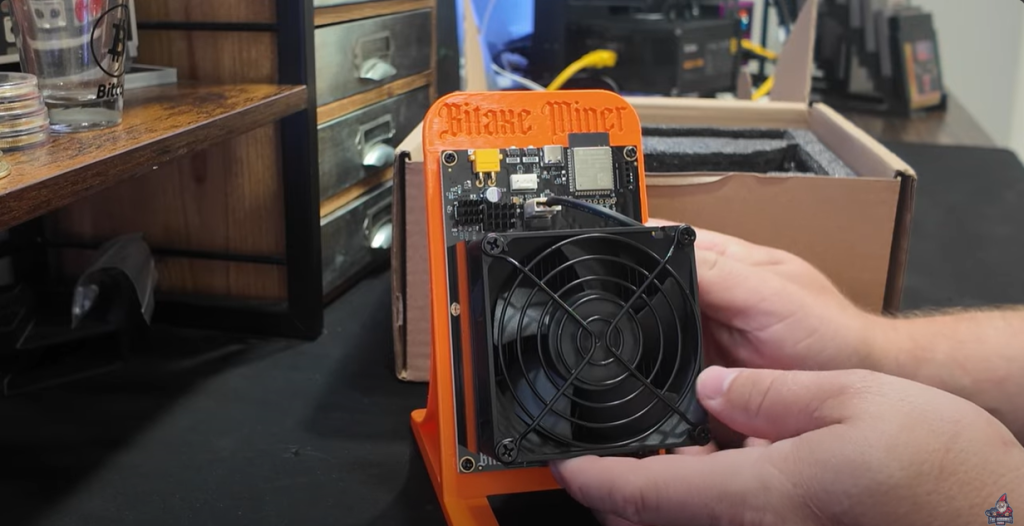
Let’s get right into it. The unboxing experience with the Bitaxe Supra Hex is pretty awesome. The moment you open the box, you can tell this thing is heavy duty.
It’s built tough, way sturdier in the hand than you might expect from a mini miner. The naming conventions are wild—Supra, Gamma, Hex, Turbo—feels like what you’d get if bitcoin mining gear was designed by a team who also names energy drinks! But hey, names aside, the quality here jumps out at you.
What’s in the Box:
- The Bitaxe Supra Hex miner itself
- A slick 3D-printed stand
- A power supply (more on this in a bit)
- Some documentation
- A bit of attitude, if you go by the wild naming
First Look Impressions:
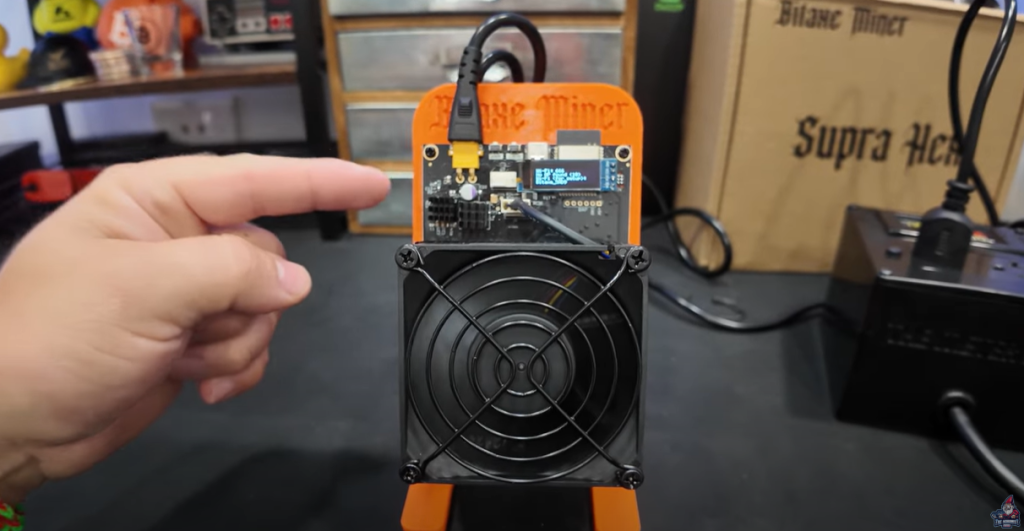
- Huge heatsink on the front—seriously thick.
- Quiet but powerful fan.
- A simple digital screen embedded in the chassis (not just tacked on outside).
- Feels solid and well-assembled, not like a cheap DIY project.
Follow along the full unboxing with this video
The Appeal of Home Solo Mining (Even If You Never Hit a Block)
Let’s be real—most home miners never hit a Bitcoin block solo mining. It’s just statistically crazy, but honestly, that’s not what keeps most of us going.
I love tinkering, but I also love that, unlike huge commercial miners, these little rigs won’t break the bank. It’s like having a lottery ticket that redraws every 10 minutes, without feeling like you’re throwing your money away each week.
“My chances of hitting a bitcoin block is pretty, pretty crazy. Right? Just like it would be if you were to go and buy a lottery ticket. But the nice thing is this is a lottery ticket and that lottery is pulled every 10 minutes, which is cool. And OK, if I ever hit that magic block, you’ll be the first to know—after my family, of course. “ – The Hobbyist Miner
Breaking Down the Hardware: Supra Hex Design & Specs
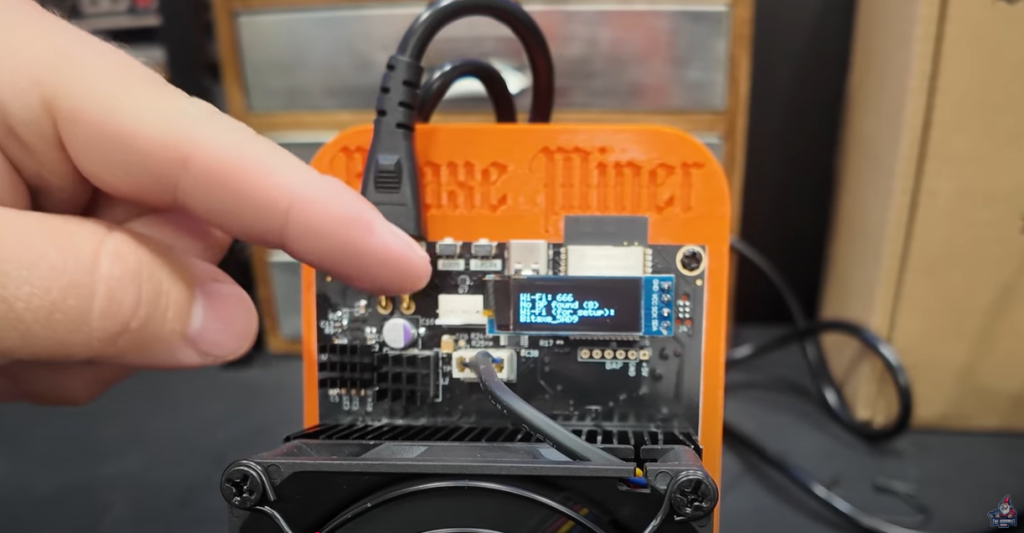
Alright, now let’s get nerdy. The Supra Hex isn’t just some random, 3D-printed science fair project. The team at Bitcoin Merch went all out here:
- Massive Heatsink: This thing’s got a front end that would make most GPUs jealous. Stays cool, runs quietly.
- Silent Operation: The fan is barely audible. For anyone hoping to actually sleep in their house while mining, that’s a big win.
- Custom Power Connector
- Specs (from the box and online):
- Hashrate: ~4.2 Terahash (TH)
- Power Supply: 100-240V, 120 Watts (but real wall pull is around 75W, more on that later)
- Fan: 6,500 RPMs rated, but runs whisper quiet
- Super simple control display
Little Touches:
- The 3D printed stand is practical AND looks sweet on a shelf.
- The UI has that classic “WiFi 666” bit of playful hardware humor.
- The miner boots up fast and shows connection status directly.
Power Consumption and What It Costs to Run
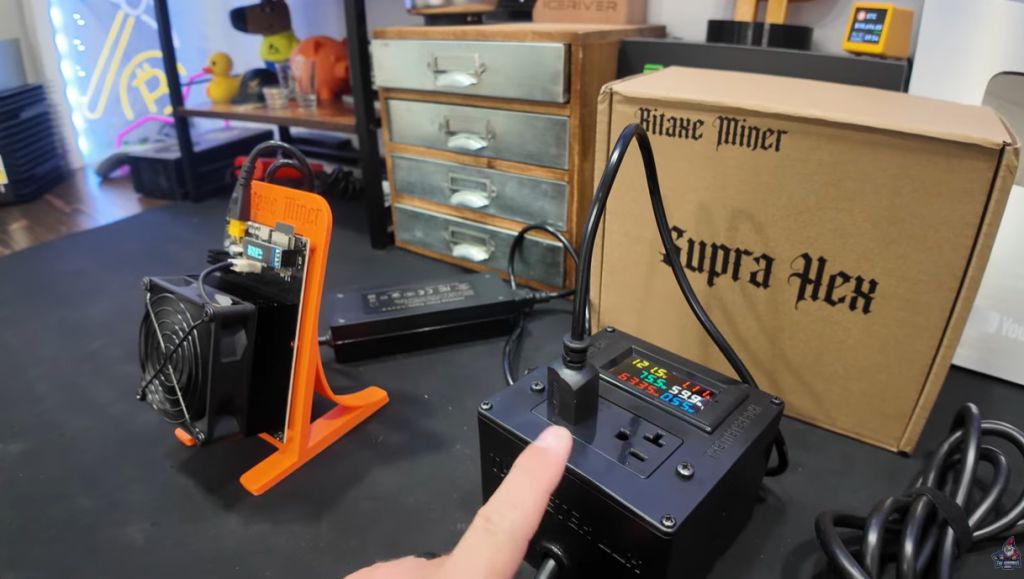
What about your electric bill? This is where these home solo miners really shine.
- Idle/Run Power Use: Only about 75 watts at the wall when running full 4.2 TH/s.
- That’s literally less than a basic light bulb these days.
- For anyone with expensive power rates, that’s actually a big deal. This won’t make a dent in your monthly electricity cost, unlike massive ASIC rigs that need a dedicated circuit.
Here’s what the readout looks like on my watt meter:

“We’re talking close to nothing like a light bulb. Not even a light bulb is where we would come in at. So this, these are a lot of fun.” – The Hobbyist Miner
For context, most large ASICs pull hundreds to over a thousand watts, so this is truly in “plug and play at home” territory.
Who Is This Miner For? My Honest Thoughts
Let’s cut through the hype—this isn’t a “get rich quick” machine. The Supra Hex is for:
- Tinkerers and hobbyists who want to learn and have fun
- Folks who want to support the Bitcoin network’s decentralization
- Anyone who wants some skin in the game without investing crazy money or dealing with heat/noise
- DIY fans intrigued by running their own node or building out a small home crypto setup
- Those dreaming of that one-in-a-million shot at solo block glory
It’s NOT for:
- People looking to make steady daily profits
- Anyone bothered by “lottery odds” mining rewards
Setting Up the Supra Hex: Step-by-Step Guide
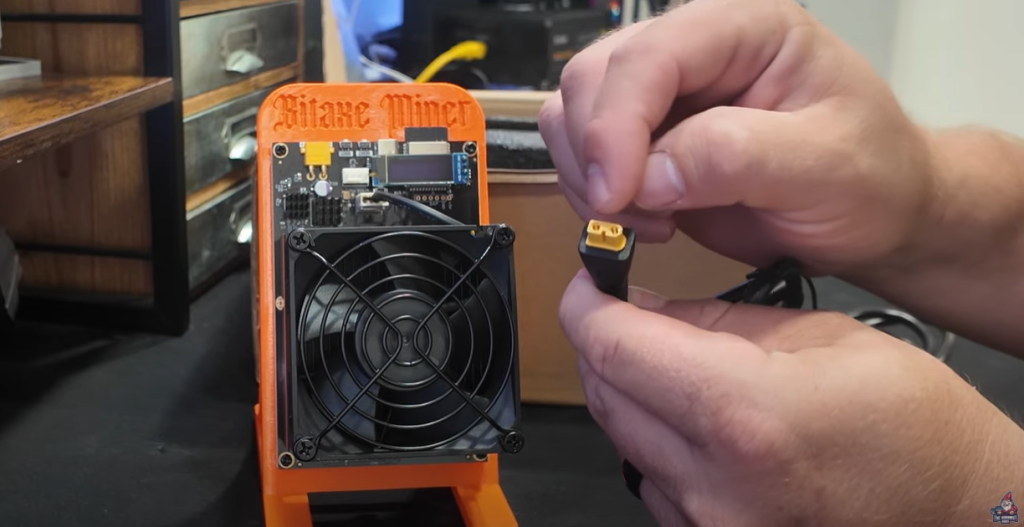
Curious how hard it is to set all this up? Spoiler: It’s a breeze.
Follow along the full unboxing and setup with this video
Unboxing & Stand Assembly
- Take everything out.
- Slot the Supra Hex into the 3D printed stand.
- Plug in the huge (and rather unique) power connector to the unit.
Connecting and Powering Up
- Plug in the power supply and the Supra Hex fires right up.
- The fan is ultra-quiet—you almost can’t hear it.
- The display lights up (mine humorously flashed “WiFi 666”).
WiFi Setup
You’ll notice the Supra Hex creates its own WiFi network. Here’s the basic sequence:
- Look for WiFi networks named something like bitaxe_xxx or similar.
- Connect your phone or computer to that WiFi.
- Open your browser and go to 192.168.4.1.
- Enter your local WiFi details (SSID and password).
- The miner jumps onto your network and heads online.
Pool Settings & Node Selection
Enter your pool details (I suggest running your own Bitcoin node—more on that later).
Software/Web UI
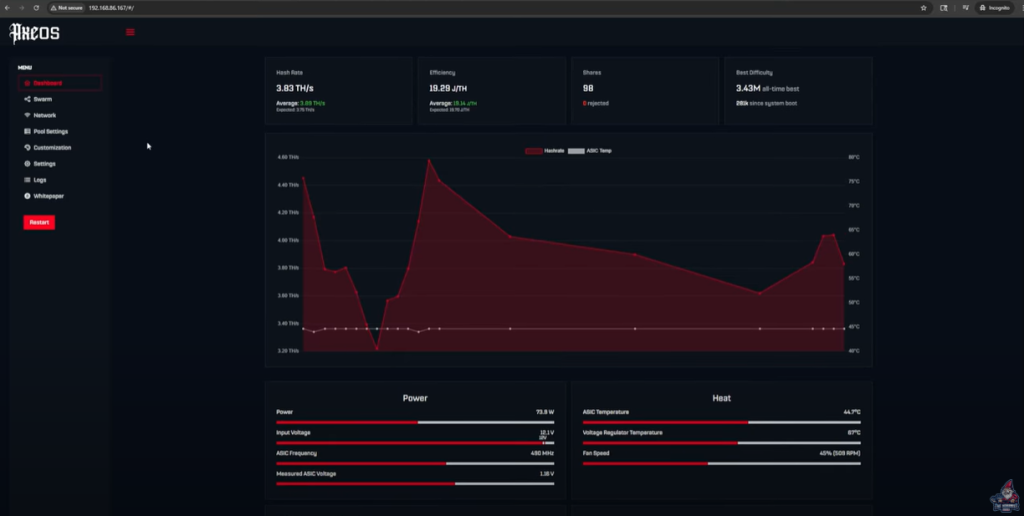
The device runs a familiar AxeOS mining firmware. After connecting, you reach your dashboard where you can check:
- Hashrate (shows right after boot, updates live)
- Pool settings and connection status
- Fan RPM, temperatures, uptime
Super easy and intuitive UI.
Solo Mining, ROI, and Why It’s Like the Bitcoin Lottery
Time for some real talk—solo mining is a lottery.
Let’s crunch the numbers.
What’s Your Chance to Strike Gold?
With the Supra Hex’s average 4.2 TH/s, your raw chance of hitting a full Bitcoin block in a year is about 1 in 4,766. Yep, that’s long odds—but again, there’s a new draw every 10 minutes.
But Wait! What If You Have a Farm?
Combine a bunch of these units. For example, my own setup averages about 35 TH/s (with 12+ miners). At that scale, your odds improve to about 1 in 572 per year—not bad if you really want to swing for the fences.
Checkout my Home Solo Bitcoin Mining Farm in this Video
Reality Check on ROI
If you’re mining for profit and expect to see cash flow, this isn’t for you. Think of this as a fun learning project with the tiniest cost of entry.
Connecting to Your Bitcoin Node and Pool—Ultra Low Latency
If you really want to geek out and maximize your chances, run your own Bitcoin node and connect your Supra Hex (and any other miners) to it. Here’s the setup I use:
“I set up my own bitcoin node with a little mini PC and an upgraded solid state drive. Actually an NVMe and off we went. I actually have a full video on how you can do this at home yourself.” – The Hobbyist Miner
This gives you:
- Full control (no reliance on 3rd-party pools)
- Near zero latency between your miners and node/pool
- Your rewards (when you win!) sent directly to your address
- Added decentralization to the Bitcoin network
How My Node + Pool Works
- Running Umbrel OS on a mini PC (check out Umbrel)
- Two key apps: The Bitcoin node and your pool instance (mine piggybacks on Public Pool, but all local)
Example pool config:
Pool URL: 192.168.1.180 (Notice it’s a local IP and not a public stratum address)
Port: 2018
User: mybtcaddress.bitaxsuprahex_167
Password: x
Monitor your miners, uptime, and stats all right from your own dashboard—no remote servers, no trust required.
Touring My Home Mining Shed: My Solo Mining Journey

Let’s take a field trip! Out to the shed… Watch Here
Over the years, my home crypto mining shed has evolved through:
- Phases dominated by GPU mining
- Classic ASIC madness (for heat and profit!)
- Now a nice collection of low-power, home-friendly solo miners
My Current Lineup
Let’s run through what’s running:
- NerdMiner USB Miners: Small, efficient, and easy to scale
- Bitaxe Gamma & Supra: The “big” little guys, including today’s Supra Hex star
- Bitaxe Hex: Compact and Powerful Solo Bitcoin Miner
- Braiin’s BMM101: Solo Bitcoin Miner + Node
- Canaan Avalon Nano 3s: Perfect Solo Bitcoin Miner + Heater
- MagicMiner BG01: Look like GPUs, But is a Powerful Bitcoin Miner
- Bitaxe Touch Miner: Ultra-cool Bitcoin Miner with a Touch Screen
- Goldshell Bytes: Sprinkle of Altcoin fun and flexibility
There’s a mini PC in the shed running:
- UmbrelOS
- Bitcoin node App
- Local Public Pool Server
All the solo miners point to this box for their work and rewards.

“Not only do I have a bitcoin node on there, I also have my own local pool.” The Hobbyist Miner
And if you’re wondering how many miners…
- Current total: 12 units (and growing!)
Uptime is always solid, flexibility is great, and it’s way more fun than just staring at a static rig all day.
Hashrate after newest additions: Steadily hovering at or above ~35 TH/s total.
Setup your own Bitcoin Node in 15 Minutes with this Guide Video
Should You Get a Bitaxe Supra Hex? Final Thoughts and Discount Codes
After weeks of hands-on testing, here’s the verdict:
Pros
- Ridiculously easy to set up and integrate
- Silent—it’s quieter than your laptop fan
- Ultra low power draw—won’t even notice on the electric bill
- Fun and educational, with just enough “lottery” thrill
- Supports network decentralization, especially when paired with your own node
Cons
- Low odds of solo block wins (but that’s true for all solo mining)
- Not a daily-profitable miner (manage your expectations please!)
Who should buy?
Anyone who wants to learn, tinker, and participate in the Bitcoin network at home, with almost no ongoing costs. Not for people looking to flip and earn money right away.
Discounts & Links
If you want to get your own Bitaxe Supra Hex, Bitcoin Merch has hooked us up with a discount code—because who doesn’t like saving a little?
“You can use the code hobbyist at checkout to save you guys a nice $22.49 off of this unit before shipping, so go check it out.”
Grab the Bitaxe Supra Hex here (Bitcoin Merch official)
FAQs
Is the Supra Hex noisy?
Nope! It’s basically silent. The large heatsink and low-wattage setup mean fan noise is nearly undetectable, and you can keep it in any room.
What’s the real chance of solo mining a block?
With one Supra Hex (~4.2 TH/s):
- Chance per year: about 1 in 4,766
- Think of it as buying a lotto ticket where you can reuse your ticket every 10 minutes.
Does it need its own dedicated power?
Nope! 75 watts is less than most household devices, so you can plug it into any regular outlet.
Can I use it with my own Bitcoin node?
Absolutely—and I totally recommend it. Super easy setup with software like Umbrel and gives your mining that “pro” touch with low latency. However you can also use a Public Solo Bitcoin Pool too.
Will I get rich solo mining?
Let’s be honest—probably not! But this is more about learning, fun, and being part of the ecosystem. “So you’re telling me there’s a chance…” – Dumb and Dumber Movie
Final Words
Big thanks again to Bitcoin Merch for sending over the Supra Hex for review and for always pushing the envelope with these mini miners. If you want more content, tips, and my next crazy mining project updates, be sure to subscribe to the Youtube Channel, check back next week for another new article!
Happy (solo) mining!