Perfect BEGINNER Home BITCOIN Miner in 2026! — Bitaxe GT Gamma Turbo
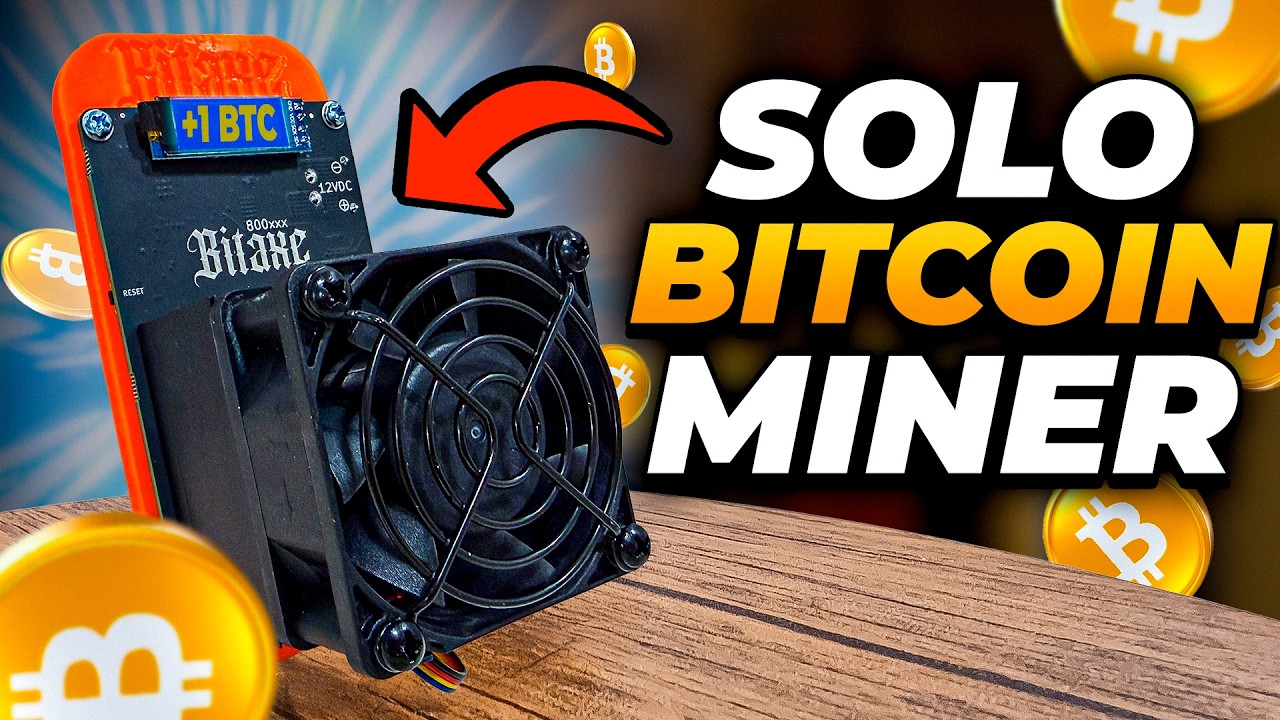
Welcome back, crypto miners! If you’re as excited about home Bitcoin mining as I am, you’re in the right place. Today, we’re jumping into a detailed look—and some hands-on action—with the all-new Bitaxe GT Gamma Turbo. Yep, the names keep getting wilder, but so do the features!
Whether you’re a seasoned miner or just getting started with your solo Bitcoin mining journey, this post walks you through everything you need to know about this new Bitaxe model: setup, specs, performance, real-world impressions, and where this miner fits into the crazy world of at-home solo mining in 2026. Plus, I’ll cover how this miner measures up in terms of profitability, noise, and usability, and I’ll share some tips on running your own Bitcoin node at home.
Let’s get mining!
For more on this topic check out this detailed topic: Perfect Beginner Home Bitcoin Miner in 2026
Table of Contents
- Meet the Bitaxe GT Gamma Turbo
- Specs and First Impressions
- Physical Overview
- Setup: Power, Connections, and Configuration
- Initial Boot and Screen Features
- Mining Modes: Pool vs. Solo
- Profitability: By the Numbers
- Solo Mining Odds: Bitcoin’s Lottery
- Running Your Own Bitcoin Node at Home
- Firmware Updates & Umbrel OS
- Performance Tests: Power, Noise, and Hashrates
- Final Thoughts: Is This The Perfect Beginner Miner?
- Links, Resources, and Community
Meet the Bitaxe GT Gamma Turbo

Let’s kick things off with the star of today’s show: the Bitaxe GT Gamma Turbo. The naming convention is, well… let’s just say, they must have had fun with this one.
“These names get crazier and crazier. This here is the Bitaxe GT Gamma Turbo. How many of these names can we throw into one?” – The Hobbyist Miner
The Bitaxe GT Gamma Turbo is a relative of the Bitaxe Gamma, but it’s got more horsepower under the hood. While the standard Bitaxe Gamma comes in around 1 to 1.2 terahash, this Bitaxe GT Gamma Turbo can do 2 to 2.2 terahash. Let’s check out what that actually means in day-to-day use.
Specs and First Impressions
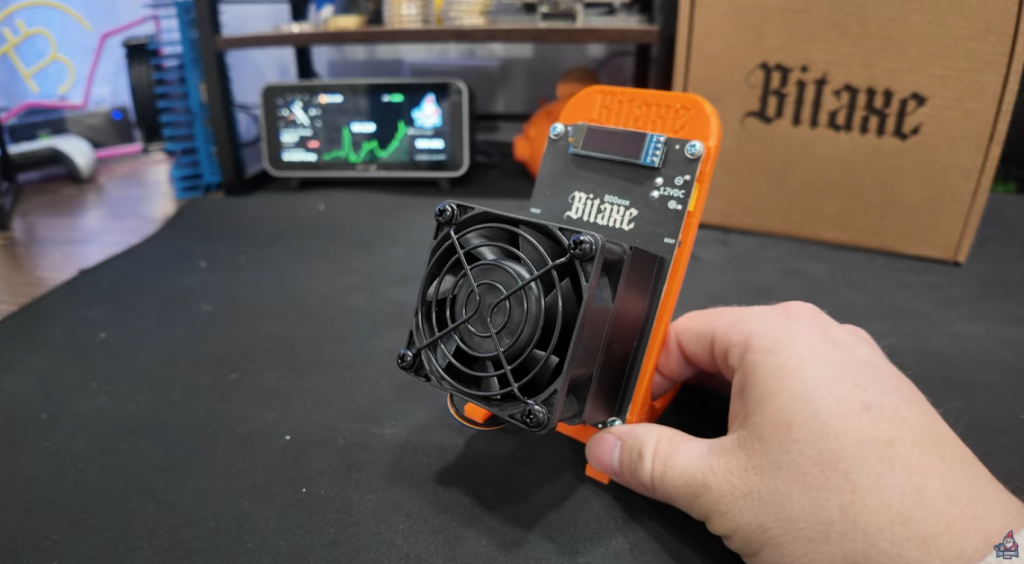
Here’s a quick glance at the specs that make the Bitaxe GT Gamma Turbo stand out:
- Hashrate: 2 – 2.2 Th/s (tested up to 2.6 Th/s in my run)
- Chips: 2x BM1370 (the same ones used in the Bitmain Antminer S21)
- Cooling: Decent size aluminum heatsink + Noctua NF-A6x25 3000rpm fan
- Power Input: 12V DC with a sturdy yellow connector (no more barrel connectors!)
- Screen: Compact, blue text on black, different from previous models
- Interface: Simple, includes WiFi ad-hoc connection for setup
- Power Usage: About 62 watts at the wall (my testing)
It’s not just about performance numbers—the build design and usability changes make a real difference here. Let’s break it down!
Physical Overview

Let’s get our hands on the miner itself and see what comes in the box, what’s new, and what’s familiar.
Prefer Video? Checkout the Unboxing of the Bitaxe GT Gamma Turbo Here
Build & Appearance
- Heatsink: Good-sized, all-aluminum, for effective cooling.
- Fan: Not just any fan—a Noctua NF-A6x25 running at up to 3000 RPM. When it first powers on, it’s loud, but it settles down quickly and is known for being quiet while moving a ton of air.
- Ports & Buttons:
- New XT30: A big upgrade from flimsy old barrel connectors; looks and feels more solid.
- 12V DC Input: Clearly marked.
- Reset and Boot Buttons: Easy to access on the left—no more poking around with paperclips!
- USB-C Port: Up top for direct connection to a PC for flashing firmware or factory resets.
- Screen: Smaller in size, but an interesting twist with a blue text/black background combo.
“I love the fact that we’re moving away from the barrel connectors and moving more to these more secure connections here with the XT30. Barrel connectors have always been questionable to me.” – The Hobbyist Miner
Setup: Power, Connections, and Configuration

Powering Up
The miner uses a 12V DC input and ships with an AC/DC adapter that supports 100-240V at 1.6A—so anywhere in the world, you’re covered. The yellow connector(XT30) is firm and clicks in; it feels like an upgrade over previous connection types.
Connecting to the Miner
- On first boot, the miner broadcasts a WiFi SSID (something like Bitaxe_D73D). All you need to do is connect your phone or computer to that ad hoc network.
- The interface is simple and browser-based, so you can configure your pool, wallet, and advanced settings.
No cables tangled, no need to wrestle with proprietary software. It’s about as plug-and-play as Bitcoin mining gets.
Initial Boot and Screen Features
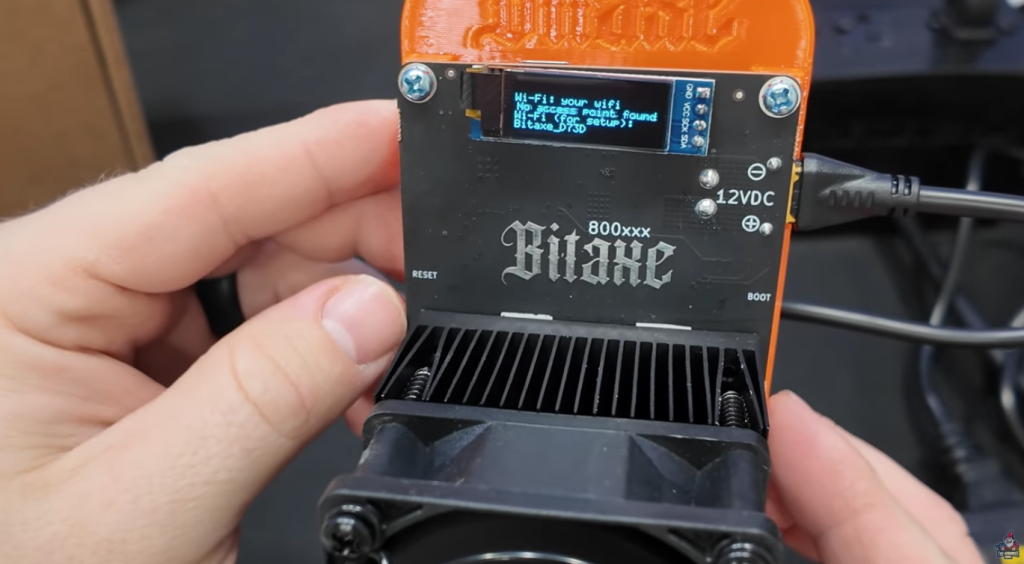
On power-up, the Noctua fan spins up loud—but just for the initial moment. The small screen comes to life with a fresh twist on style:
- Screen: Blue text on a black background—different from the plain-old LCDs on previous miners.
After a few seconds, you’ll see status details: model ID, temperature, hash rate, uptime, and connection status. Handy for at-a-glance checkups without having to log into the software every time.
Hear the Noctua Fan in action in this Bitaxe GT Gamma Turbo Video.
Mining Modes: Pool vs. Solo

Let’s talk about how you can actual run the Bitaxe GT Gamma Turbo, Pool Mining or Solo Mining.
Pool Mining
You can point the Bitaxe GT Gamma Turbo at a pool (like PowerPool, F2Pool, or ViaBTC), but based on power consumption and hashrate, this probably isn’t your ticket to daily profitability. At -$0.14 in profitability at a $0.15 kWh electric rate, it’s a no brainer.
“I do not believe this is going to be a smart move to pool mine with this for daily profitability and bitcoin payouts. This is actually built for solo mining, which means it is purpose built to play the bitcoin lottery…” – The Hobbyist Miner
Solo Mining
Where this device shines is solo mining. What’s that? Instead of splitting rewards with a pool, you work alone. Every 10 minutes, a new Bitcoin block is found, and you have a (tiny) chance of finding that block yourself—for the full block reward, 3.125 Bitcoin!
- The Upside: Score a full block reward (~$284,383 at recent numbers!).
- The Downside: Odds are long. Like, Mega Millions long.
Why bother? Because, for many, it’s as much about learning, tinkering, and operating a full node in the Bitcoin network as it is about profit. Plus, unlike state lotteries, you only pay once for your “ticket” (the miner).
Profitability: By the Numbers
Let’s punch in the real numbers, so you know exactly what to expect.
Pool Mining (for context)
Here’s how things look if you join a mining pool for traditional mining:
| Hashrate | Power Usage | Elec. Cost (Per kWh) | Estimated Pool Earnings | Daily Cost | Net Profit |
| 2.2 Th/s | 62W | $0.15 | $0.08/day | $0.22/day | ~$0.14/day |
“So that’s going to tell you is if you were going to pool mine with this… you would make 8 cents a day but it would cost you 22 cents a day. So you would actually earn negative 14 cents a day.” – The Hobbyist Miner
This is why solo mining is the realistic use for the Bitaxe GT Gamma Turbo. You’re not buying a steady income stream—you’re taking a shot at the full prize.
Solo Mining Odds: Bitcoin’s Lottery
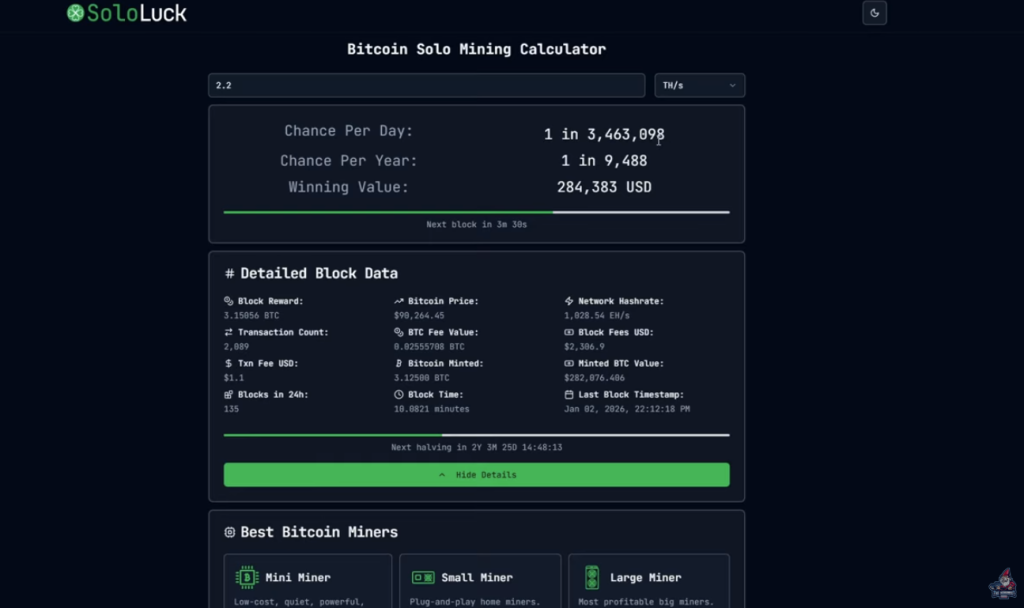
Here’s the reality of solo mining:
Using SoloLuck.com, let’s see your chances of scoring a block with just the Bitaxe GT Gamma Turbo:
- With 2.2 Th/s:
- Odds per day: 1 in 3,463,098
- Odds per year: 1 in 9,488
- Today’s Block Reward: ~$284,383
Pro tip: Unlike the lottery, you only pay for the miner once. Your “ticket” keeps playing, round the clock. Which is a Win/Win verse a traditional state lottery.
Should You Solo Mine?
- If you want steady daily profit, this isn’t for you.
- If you love the idea of a chance at a huge Bitcoin payday, or just want to support the network and learn, this solo miner could be your next favorite gadget.
Running Your Own Bitcoin Node at Home

If you’re solo mining at home, you really want to run your own full node. Here’s how I set mine up—and why it’s worth it.
Why Run Your Own Node?
- Direct Pool Control: You run the “pool” your miners hit, instead of relying on a third party pool and having to split some of the block reward.
- Privacy & Security: Your node, your rules, your data. Knots vs Core?
- Network Resilience: Boosts the Bitcoin network.
- Better Chances: There is something to be said about having lower latency between your Solo Bitcoin Miners and a localized pool. Worth the chance right?!
“I actually have a full video showing how to set this up on any old PC you’ve got lying around. It’s super beginner-friendly, and I definitely recommend checking it out.” – The Hobbyist Miner
Pool Configuration Example
Here’s a peek at how my Bitaxe GT Gamma Turbo was set up:
- Primary: Home Bitcoin node IP & port (e.g., 192.168.1.10:3456)
- Wallet: My Bitcoin wallet address
- Miner Name: e.g., Gamma GT Turbo
- Public Pool failover: (like public-pool.io) with your wallet address
Pro Tip: Pick a fast SSD for your node if you’re building one. Bitcoin’s blockchain is huge and a speedy drive keeps things smooth. I recommend a 2 TB NVME.
Performance Tests: Power, Noise, and Hashrates

Let’s get down to the real-world numbers. How does the Bitaxe GT Gamma Turbo hold up on power, noise, and hashing?
Power Draw
- Idle/startup: 62 watts at the wall (measured with a MeterBox Watt Meter).
- During mining: Stays between 62–63 watts, even after 10 minutes under load.
Noise
- Startup: The Noctua spins up LOUD. This is normal—it’s running a self-test.
- After startup: Quiets down, but with 3000rpm, it’s audible. At two feet away, about 58–59 dB (measured with a sound meter).
- Summary: Not silent, but not as crazy loud as a big ASIC like an S19J Pro. In a garage or basement, it’s no problem.
Hashrate
- Rated: 2–2.2 Th/s
- Real-World: I clocked it at 2.6 Th/s at peak, holding well above the spec sheet.
Note: Hashrates can fluctuate over time and based on environmental conditions.
Final Thoughts: Is This The Perfect Beginner Miner?
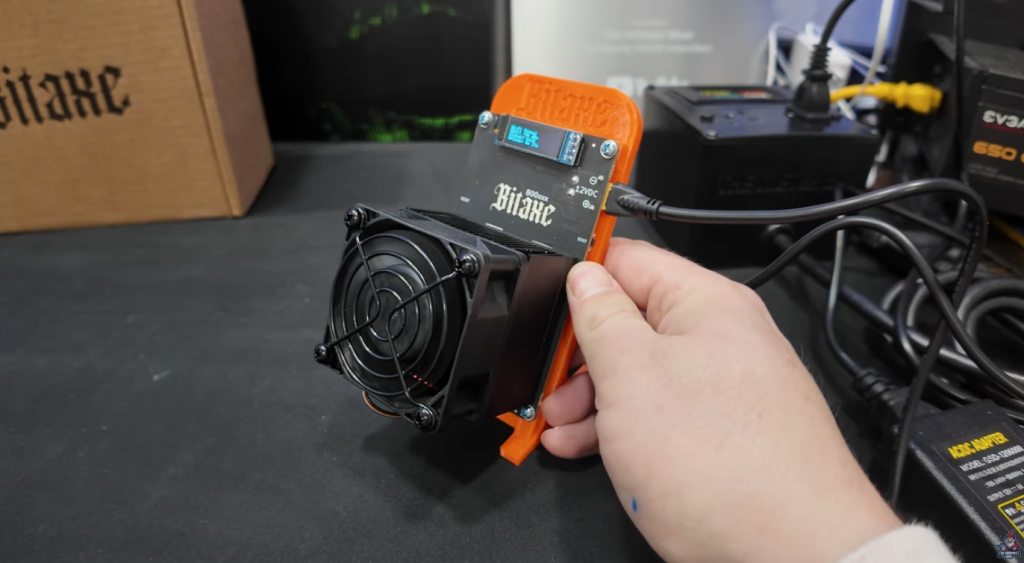
If you’re looking for a profit-driving, industrial-scale miner… the Bitaxe GT Gamma Turbo probably isn’t it. But that’s not the point.
If you:
- Want to learn about Bitcoin mining, nodes, and the network
- Are fascinated by the lottery of solo mining
- Want a device that’s small, relatively quiet, and easy to set up
- Prefer hardware that isn’t going to blow your house’s circuit breaker
Then the Bitaxe GT Gamma Turbo is a fun, affordable gateway into the world of home Bitcoin mining.
“You spend $299 on this on Bitcoin Merch’s site. And you don’t have to rebuy that lottery ticket every 10 minutes. You just set this, forget it and hey, it’s a fun toy to tinker with. And possible opportunity for you to definitely bring in $284,383 which is pretty badass.” – The Hobbyist Miner
What I Love:
- Way better connectors and build quality than past micro miners
- Setup is easy—true beginner territory
- Surprising real-world performance
- Great for home solo mining and learning
What I Don’t:
- It’s loud at startup, I am running mine in my shed with my other Home Solo Bitcoin Miners.
- Not profitable for pool mining—only worth it if you enjoy the solo mining experience
See You Next Time!
Got questions? Join The Hobbyist Miner Comunity Discord for great fellow crypto miner conversation, community help and more! Join entirely free here!