How to Mine Bitcoin with Your PC or Laptop: A Step-by-Step Guide for Beginners

Want to earn some Bitcoin while you’re at work, school, or even sleeping? Great news—you don’t need a fancy mining farm, an engineering degree, or to hand over tons of personal details. In this big, detailed step-by-step guide, I’ll walk you through how to mine Bitcoin with your home PC or laptop using Kryptex Miner. I’ll break it down so anyone can follow along, highlight what to expect, and toss in plenty of screenshots and tips for getting set up with zero headache. (And yes, there are absolutely no age restrictions and no KYC hoops to jump through.)
Ready to mine some crypto from the comfort of your desktop? Let’s dive in.
For more on the topic check out this detailed video: How to mine BITCOIN with your PC or Laptop!
“This is a tutorial, a step by step guide on how to earn Bitcoin with your home computer. I’m not saying you’re going to get rich and I’m not saying you’re going to make buku bucks by doing this. But you will learn the basics about Crypto Mining!” – The Hobbyist Miner
Table of Contents
- Why Mine Bitcoin on Your PC or Laptop?
- What is Crypto Mining? Quick Facts
- Introducing Kryptex Miner
- Supported Hardware: What Can You Use?
- Payout Options: Not Just Bitcoin!
- How to Get Started: Full Step-by-Step Guide
- 6.1 Create Your Kryptex Account
- 6.2 Download the Kryptex Miner App
- 6.3 Install & Log In
- 6.4 Configure Your Mining Setup
- 6.5 Run a Hardware Benchmark
- 6.6 Monitor Your Rig and Earnings
- 6.7 Set Up Payouts
- 6.8 Tips: Mining Safely and Comfortably
- FAQ About Mining Bitcoin with Kryptex
- How to Store Your Earned Bitcoin Safely
- Final Thoughts
Why Mine Bitcoin on Your PC or Laptop?
Let’s get real: No, you’re not about to make “buku bucks” by mining Bitcoin on a single PC. But what you will get is a great way to experiment with mining, earn some Bitcoin on the side, and max out your hardware’s potential when you’d otherwise be letting it sit idle.
Whether you’re….
- At work,
- Chilling at school,
- Or sleeping,
… your computer can be stacking sats in the background. Plus, you’ll get to learn the basics of crypto mining with a cool proof-of-concept project.
What is Crypto Mining? Quick Facts
Before jumping in, let’s cover the basics—especially useful if you’re totally new to the scene.
- Crypto mining is the technical process of using your computer’s hardware to help validate transactions on the blockchain. In return for your contribution, you earn small bits of cryptocurrency. Bitcoin is the “OG” and most famous coin, but you can mine others too.
- Mining software handles all the technical details: connecting you to mining pools, handling algorithms, switching coins for best profit, and moving your earned crypto into your wallet or account.
With platforms like Kryptex, you don’t need to memorize command lines or manage pools yourself. It’s as easy as clicking “Install” and letting your hardware do the heavy lifting.
Introducing Kryptex Miner
For today’s setup, we’re using Kryptex and its desktop application, Kryptex Miner.
- Kryptex Miner does all the tough work for you. It connects your hardware to their mining pool, automatically swaps coins for the highest profit, and gives you easy payout options.
- Mining pool support: You can use Kryptex just for the mining pool, or run their app directly on your PC, gaming rig, or even a big mining farm.
No matter your setup, Kryptex makes it easy to get started—even if you only have a single (decent) PC.
Supported Hardware: What Can You Use?

One of the best parts? Kryptex works with a massive range of hardware.
- Your everyday home PC
- Gaming PCs loaded with one GPU or more
- Dedicated GPU mining rigs (think: 8-card beasts)
- Huge mining farms (yep, the big leagues)
If your machine can crunch numbers and run Windows, odds are high you’re good to go. The more powerful the hardware (like big GPUs), the more profitable your mining potential.
Curious how your hardware stacks up? Kryptex hosts a resource page showing the best GPUs for mining.
- See supported GPUs
- Find out which algorithms they mine best
- Use the built-in calculator to estimate profits for your exact setup (say, 8x 3060 Ti cards)
Payout Options: Not Just Bitcoin!
Mining with Kryptex isn’t only about Bitcoin. They offer loads of payout options!
- Bitcoin (BTC)
- Ethereum (ETH)
- Stablecoins (USDT, USDC)
- Amazon Gift Cards (yes, for shopping IRL)
- …and more!
Browse the payout section to pick what works best for you.
How to Get Started: Full Step-by-Step Guide

Digging in! I’ll break everything down so you can follow along, even if you’re brand new.
If you prefer use this Step by Step Video Guide
6.1 Create Your Kryptex Account
First up, hit up Kryptex and create your free account.
Steps:
- Go to the sign-up page
- Enter your info—username, password, etc.
- No KYC required, so you don’t need to hand over your ID or wait for approval.
- When done, you’ll land on the main dashboard.
On your dashboard, check out the left sidebar; you’ll find resources for:
- Best mining GPUs
- Profit calculators
- The Kryptex Miner app download
Useful for researching and planning before you start mining.
6.2 Download the Kryptex Miner App
To start mining on your PC, you need the Kryptex Miner installed.
In your dashboard:
- Look for “Connect your computer, ASIC, or other mining hardware”
- Click Connect
- You’ll see a tab for Kryptex Miner (that’s the one you want for normal PCs)
- Note: If you have a big ASIC rig or separate miner, you may want direct mining pool details via the “Direct route” tab
- Click Install Kryptex
- The installer lands in your Downloads folder
6.3 Install & Log In
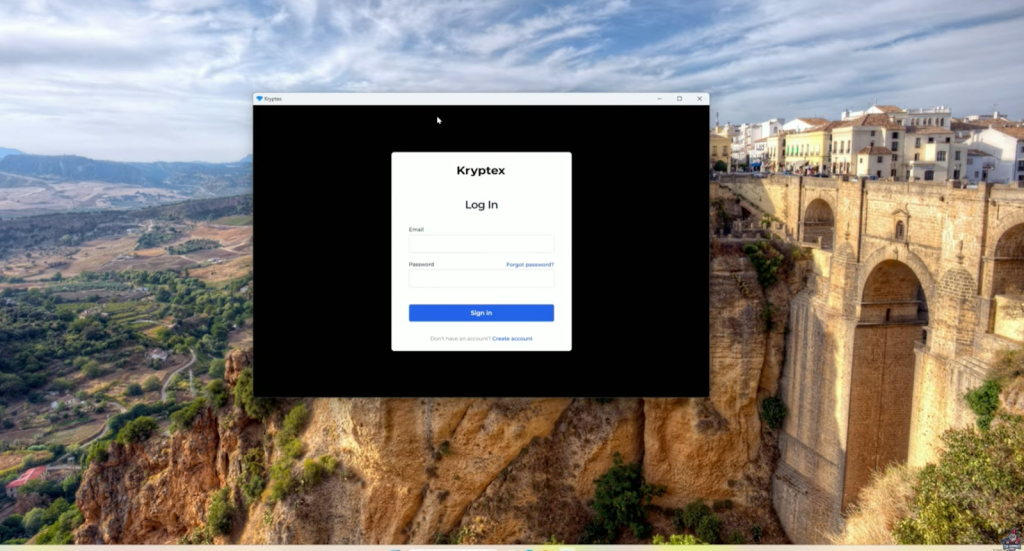
On Windows (this guide uses Windows 11):
- Navigate to your Downloads folder
- Find the Kryptex installer file
- Double-click to launch it
- If prompted by User Account Control (UAC), click “Yes” to continue
- Follow the installer:
- Click I agree
- Wait for setup to finish
When the install is complete, you’ll spot the Kryptex diamond icon on your desktop and in your start menu.
If you prefer use this Step by Step Video Guide
Logging In
- Double-click the Kryptex icon
- Enter your credentials (the same username and password from earlier)
- You’ll see the Kryptex Miner interface
6.4 Configure Your Mining Setup

Now you’re inside the app! Let’s look around and set things up:
- Unchecking “working” lets you pause mining until you’re ready to resume. Super handy if you want to time your mining sessions (like only when you’re AFK).
- If you leave “mining” running, your system will be busy, so best to start slow and run benchmarks before rolling full force.
Hardware Example: For this tutorial, the rig used is:
- CPU: AMD Ryzen 9 3900X
- RAM: 64GB DDR4
- GPU: Nvidia RTX 3090 (the “most valuable” part for mining)
Toggles: On the left side of Kryptex Miner, you can:
- Enable or disable CPU and GPU mining separately
- Customize which hardware is used—run both together or just one at a time
Navigating the App
In the upper right corner, you’ll find several icons:
- Dashboard: To check the main status and details
- Help Section: If you get stuck or have questions
- Alerts: Warnings or messages
- Settings: Tweak how the miner runs
You can also access Kryptex by right-clicking its icon near your clock in the Windows tray. From there, you can:
- Pause or start mining
- Quit the program
- Temporarily disable mining
6.5 Run a Hardware Benchmark
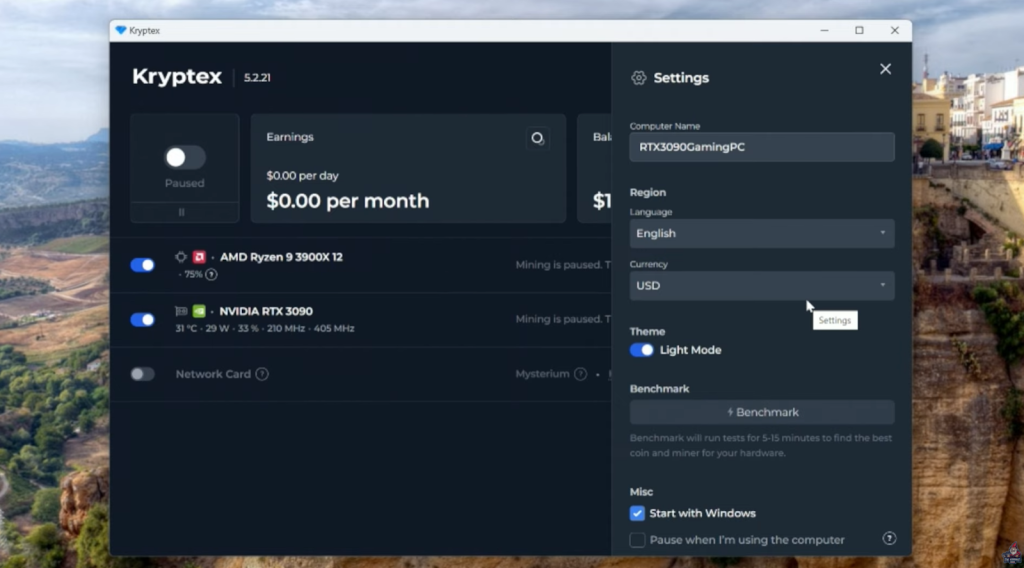
Before mining for real, run the benchmark!
- In settings, find and select benchmark
- The miner will test all supported algorithms on your hardware for best performance and profit
Benchmarking takes about 5–15 minutes. The process is hands-off, so just kick back and let Kryptex test what works best.
Once complete, Kryptex will auto-switch algorithms to maximize your earnings. Your dashboard will show exactly what each part of your rig is mining.
Example: CPU is mining “Zephyr” while GPU mines “XTM”— these will change over time based on market profitability.
If your confused, follow along with this guide
6.6 Monitor Your Rig and Earnings
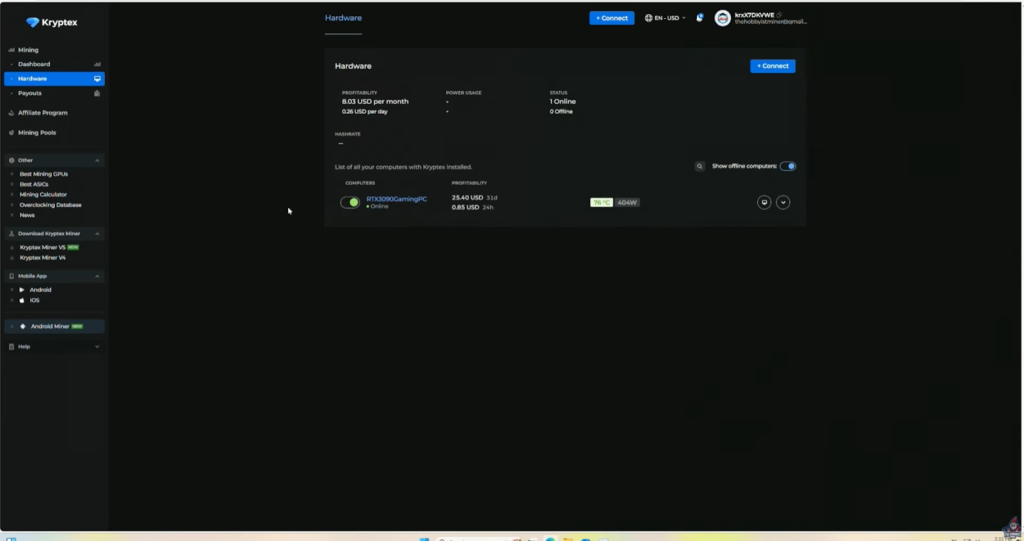
Kryptex offers real-time monitoring, straight from your dashboard.
How to View Your Stats
- Click the first icon (dashboard) in the upper right corner
- Check the list for rigs currently mining (e.g., “RTX 3090 Gaming PC”)
- Add multiple rigs if you have more than one PC
Detailed hardware info:
- Click “Hardware” in the top left
- Get a granular breakdown:
- GPU and CPU usage %
- Temperatures (stay cool!)
- Estimated profitability (how much you might earn)
- Estimated watt usage (for electric cost calculators)
- You can disable or enable mining from anywhere
Heads up: Dashboards and stats may not update instantly. Refresh or wait a few moments for new data.
6.7 Set Up Payouts
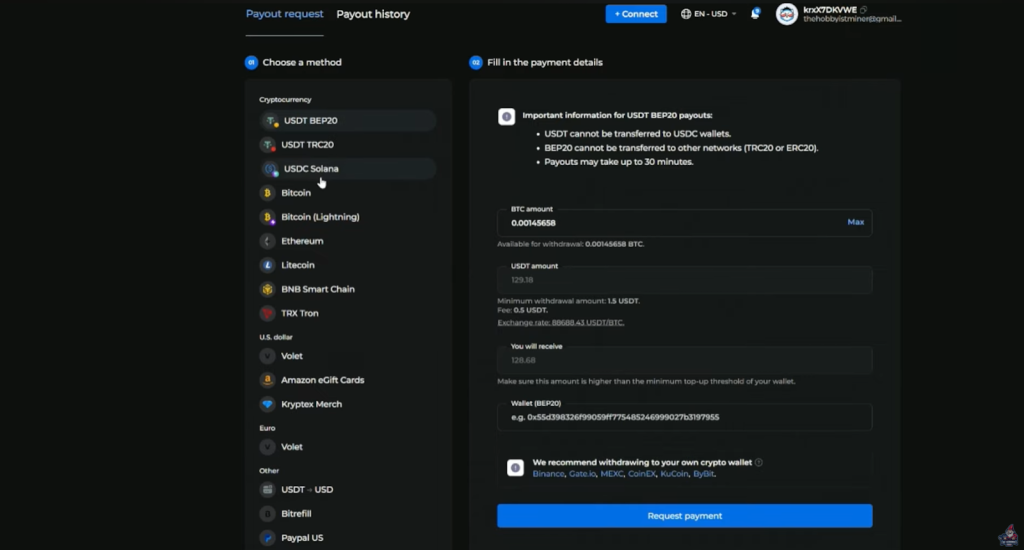
Everyone’s favorite part—getting paid!
On the main dashboard’s left-hand side, you’ll find payout options galore.
- Bitcoin (BTC)
- Ethereum (ETH)
- USDT or USDC (big stablecoins)
- Amazon Gift Cards (for shopping IRL)
- …and others
Just select your preferred option and follow the prompts to cash out your earnings. Some options may require more details, so check each payout’s requirements.
6.8 Tips: Mining Safely and Comfortably
Mining isn’t “set it and forget it” unless you set things up right. Here’s how to:
1. Control Noise and Heat
Your computer will:
- Run hotter (fans get louder to keep cool)
- Generate noticeable room heat (nice in winter, less fun in July!)
Keep your rig ventilated and monitor fan health.
2. Don’t Slow Down Your Gaming or Work
When mining is active, expect high CPU/GPU load and overall system slowness. Here’s a must-do tip:
“Go to that gear in the top right hand corner, scroll down to miscellaneous and there’s an option that says pause when I’m using my computer. I highly recommend you do that and just let it run when your computer is idle.” – The Hobbyist Miner
3. Start with Windows Option
If you want mining to begin on bootup every time, enable “Start with Windows” in settings.
4. Dark Mode
Can’t forget it! Enable dark mode for a cooler look.
5. Add and Monitor Multiple PCs
If you want to run mining across several computers (like a small farm or several family PCs):
- Name each rig for clarity (“RTX3090_Gaming_PC”, “Family_Laptop”, etc.)
- Monitor each one separately in your dashboard
FAQ About Mining Bitcoin with Kryptex
Q: Will I get rich mining Bitcoin on my PC?
Nope! This is a way to earn some Bitcoin on the side and learn the ropes, not replace your salary.
Q: Is there any risk?
Your hardware will work hard and can run hot. Always keep an eye on temperatures and use the “pause when busy” setting to avoid lag or heat issues.
Q: How much Bitcoin can I make?
Totally depends on your GPU and CPU, electrical costs, and how long you let it run. Use Kryptex’s profit calculator for rough estimates.
Q: Can I mine on a laptop?
You can, but most laptops have weaker cooling. Monitor temperatures closely and take breaks to avoid overheating.
Q: Do I need to give any personal info?
No KYC is required. Just create an account and start mining.
How to Store Your Earned Bitcoin Safely
Getting paid out is awesome—but keeping your Bitcoin safe is even better. For best security, always use a cold storage wallet.
“Make sure that you guys get yourself a good cold storage wallet. I highly recommend the Tangem wallet. ” – The Hobbyist Miner
Beginners Guide to Setting Up your First Tangem Wallet Video
What’s a cold storage wallet? It’s a wallet that keeps your Bitcoin totally offline, safe from hackers and exchange theft. The Tangem wallet is a popular option that’s easy for beginners to use.
Step-by-Step: Setting Up a Tangent Wallet
- Get a Tangem wallet
- Follow the included instructions to activate and fund your wallet.
- Transfer your mined Bitcoin from Kryptex into your Tangem Wallet.
- Store your Tangem Wallet in a safe place!
Final Thoughts
Mining Bitcoin (or other coins) on your PC isn’t going to make you a millionaire overnight—but it will get you hands-on experience, a trickle of crypto income, and a solid intro to the world of mining. With Kryptex Miner, the process is easier than ever:
- No fancy hardware required
- No KYC or restrictions
- Profits paid directly in Bitcoin, Ethereum, stablecoins, or even gift cards
So whether you’re tinkering on an old gaming rig, stacking some stats while you sleep, or teaching yourself the basics before moving up to bigger mining setups, this step-by-step guide has you covered.
Have Fun and Stay Safe!
Got questions? Join The Hobbyist Miner Comunity Discord for great fellow crypto miner conversation, community help and more! Join entirely free here!